Think 2026 Activation Agent
Continue the momentum from Think 2026 by aligning its core themes to your client’s business priorities — all within a single experience. The Think 2026 Activation Agent helps IBM sellers transform Think 2026 messaging into client-ready assets that can be tailored, shared, and reused across opportunities. The Agent is designed around Think 2026’s five core themes:
- AI Native Developer
- Identity in the Age of Agentic
- Hybrid Operations in the AI Era
- Sovereign AI by Design
- Activating Enterprise Data for AI
Following Think 2026, IBM sellers are encouraged to generate and share both a personalized Presentation and an Interactive Podcast with their clients. Repeat this process across multiple ISC opportunities to sustain engagement throughout 2026.
Keep the momentum going. Lead the conversation.
Getting Started
Step 1: Add an ISC opportunity or account number
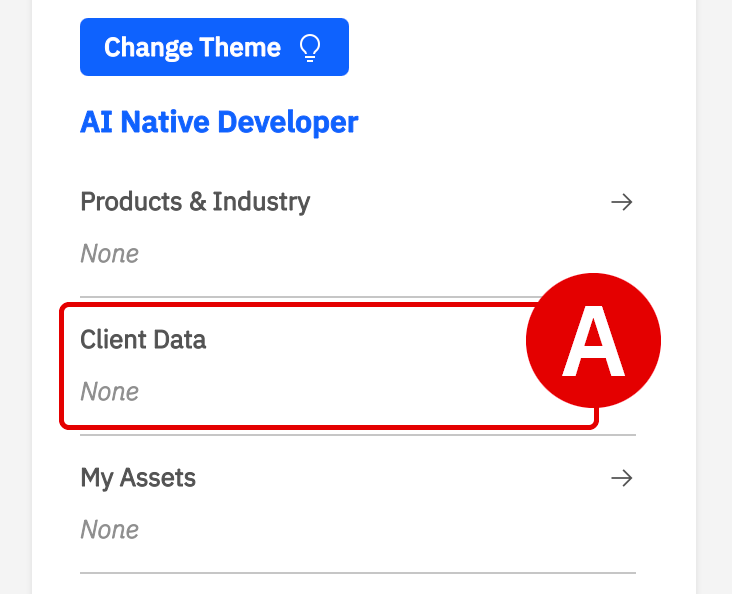
Under Client Data, you can integrate IBM Sales Cloud (ISC) data directly into your Workshop session context. This automatically brings relevant account or opportunity details into the Chat and Studio, helping align generated responses to the client relationship, opportunity history, and business context:
- Within the Think 2026 Activation Agent, locate the Context panel on the left, click Client Data (A).
- Under Configure client data, navigate to ISC ID Type (B) to select between either an Opportunity or Account.
- Enter the ISC number, then click Search (C) to retrieve the associated records
- Click Configure Session (D) to add the ISC context directly into your session.
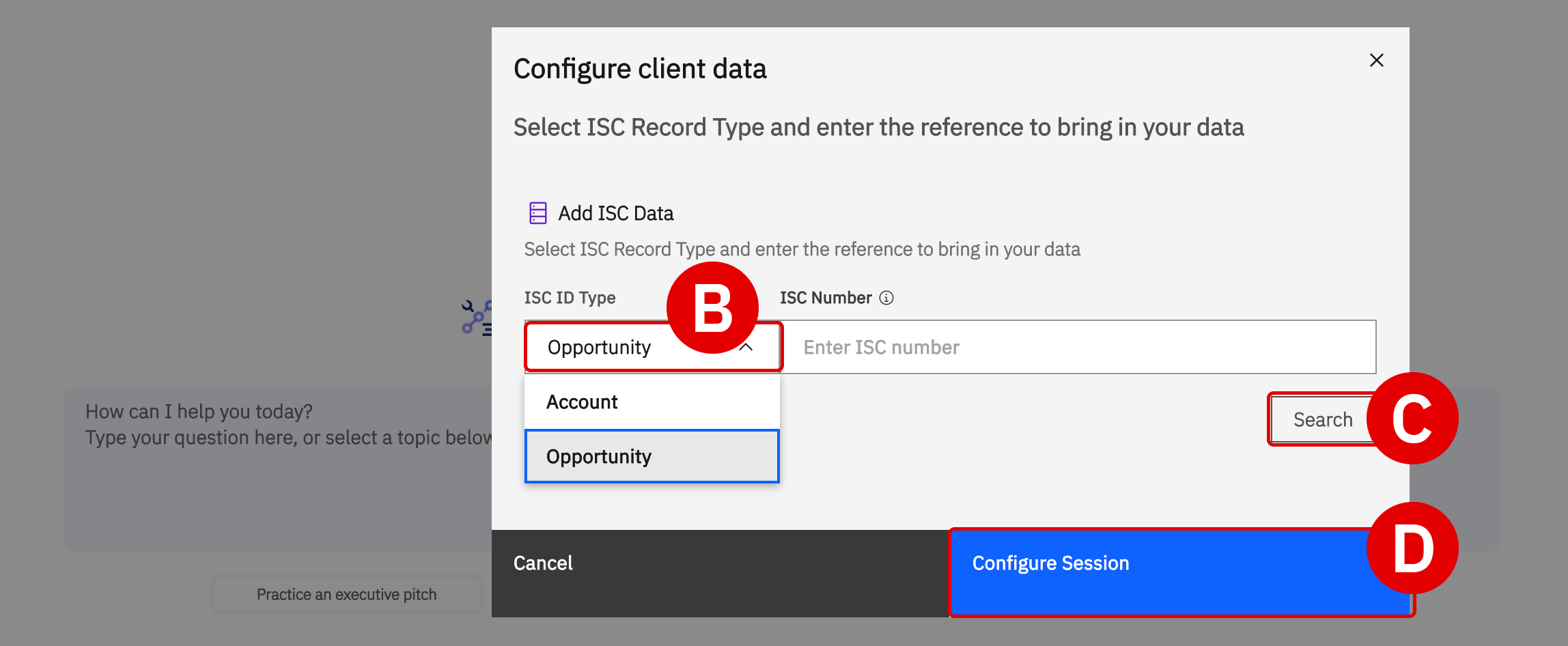
Once configured, the Think 2026 Activation Agent leverages the associated ISC opportunity and account context throughout the session. This ensures generated insights, messaging, and recommendations remain aligned to the client’s business priorities and relevant Think 2026 themes.
Step 2: Download and personalize a Think 2026 deck aligned to the client’s goals
- Click Change Theme (A) to switch between the five Think 2026 themes under Theme (B). The Agent context updates dynamically based on the selected theme.

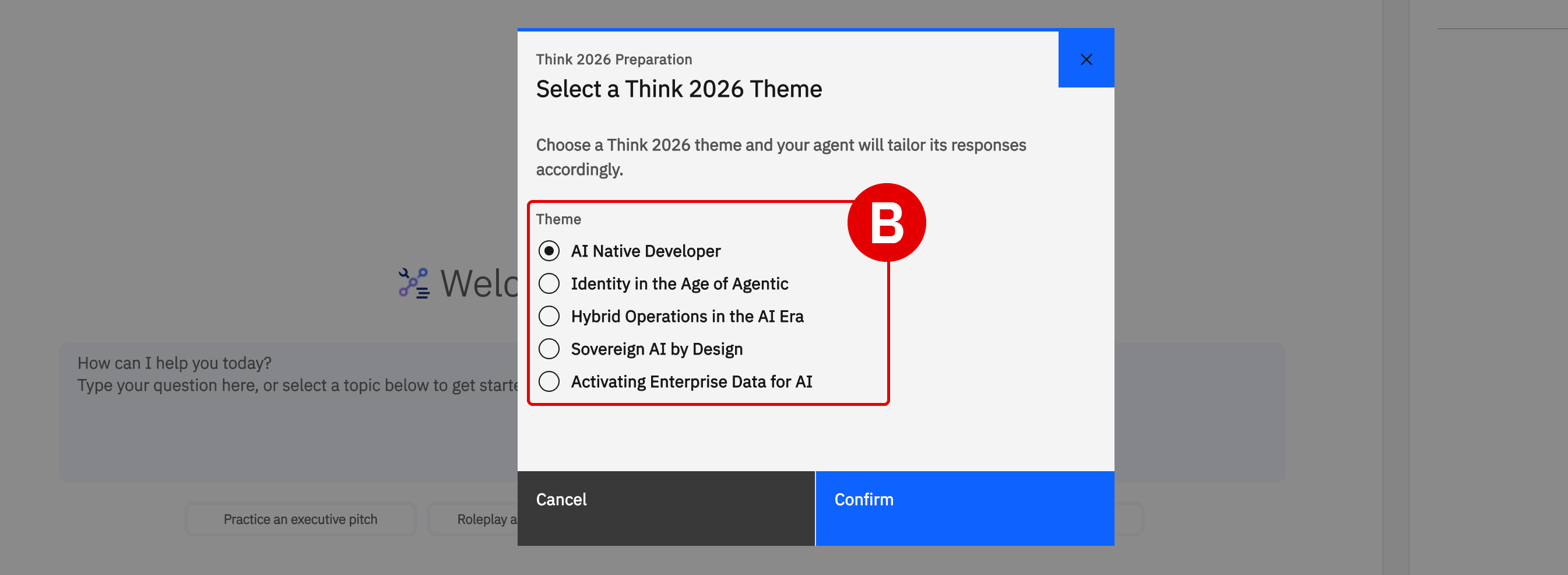
- Within the Context panel, you’ll also find a collection of client-ready PowerPoint assets aligned to the selected Think 2026 theme. Updating the theme automatically refreshes the available presentation assets.
- Select any asset link to open the corresponding Seismic source page.
- Download the presentation to begin tailoring the messaging to your ISC opportunity and client priorities.
Step 3: Customize the asset for your ISC opportunity
Within the Chat, the Think 2026 Activation Agent now has access to both your selected Think 2026 theme and the ISC opportunity/account context configured in the session. Below the chat box are Skills (A) which are designed to help quickly generate targeted, high-impact outputs using prebuilt prompts and workflows. The Think 2026 Activation Agent includes Skills such as:
- Practice an executive pitch
- Roleplay a client conversation
- Summarize key technical updates
- Practice handling objections
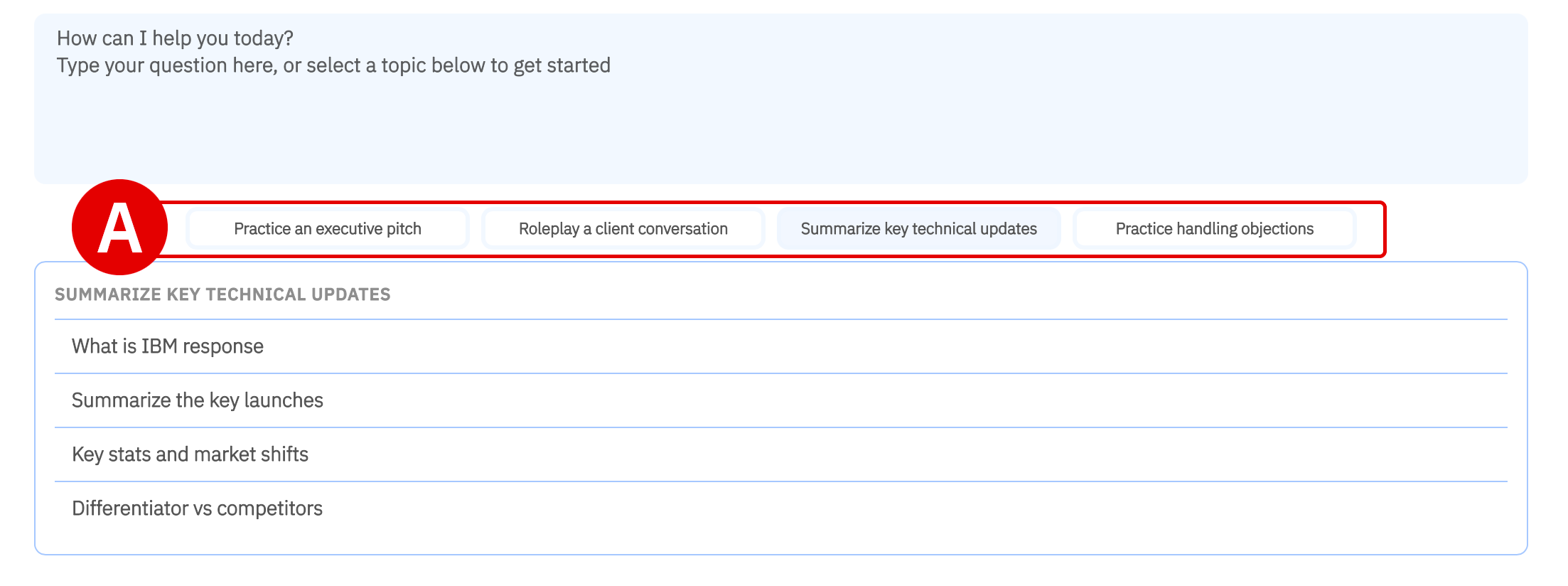
By utilizing Skills, it helps accelerate client preparation while reducing the need for complex prompting.
Using either Skills or your own prompts, begin exploring how your selected Think 2026 theme aligns to the client’s business priorities, industry challenges, and opportunity context.
As messaging and recommendations are generated, further tailor your downloaded presentation assets to create a more personalized client engagement aligned to the ISC opportunity.
Step 4: Generate and tailor an Interactive Podcast
The Interactive Podcast transforms Think 2026 themes into a conversational, multi-speaker audio experience that can be shared directly with clients. Interactive Podcast can be customized in both length and focus. For Think 2026 follow-up engagement, it is recommended to keep the duration to approximately 5 minutes or less.
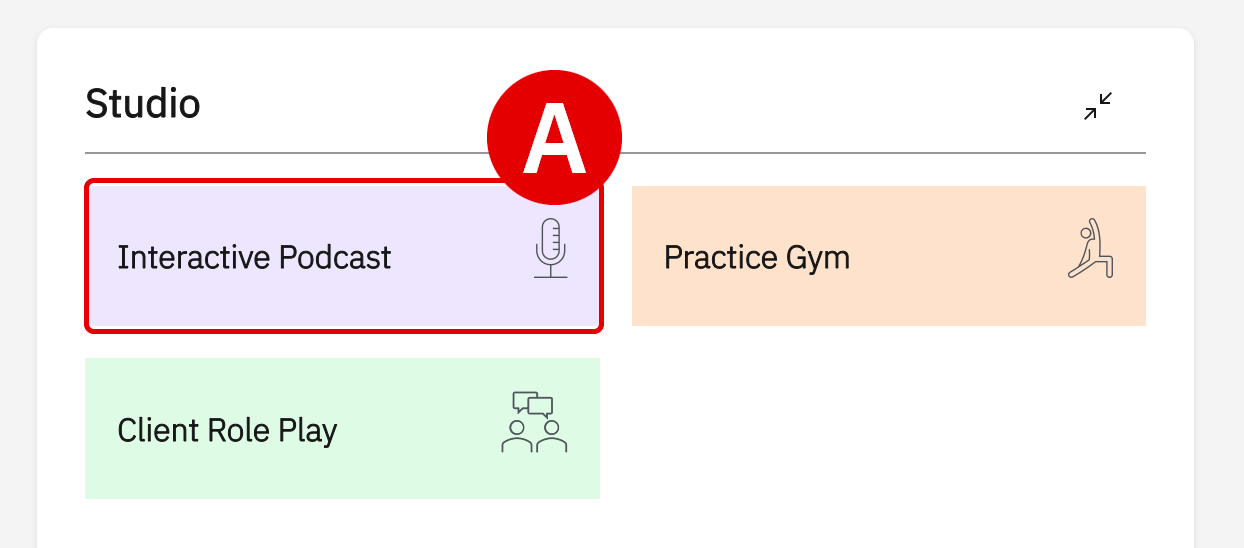
- Within the Studio panel on the right, select Interactive Podcast (A) to open the podcast generation workflow.
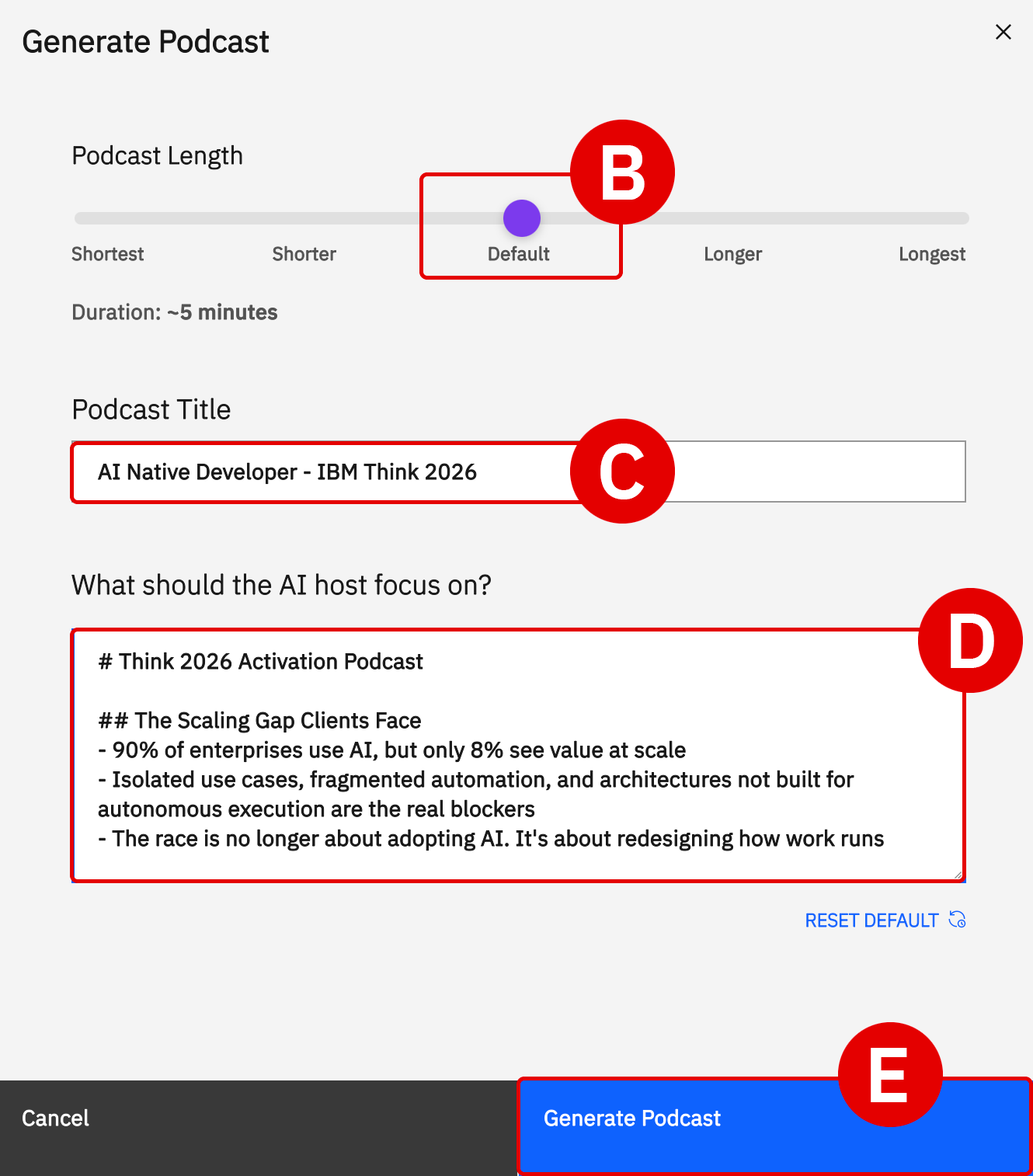
- Set the Podcast Length (B) to the default ~5-minute duration.
- Update the Podcast Title (C) to reflect your client or ISC opportunity/account.
- The Think 2026 Activation Agent will use both the configured ISC context and your selected theme to generate a more tailored podcast experience. Optionally, further tailor the What should the AI host focus on? (D) prompt with additional client-specific details such as:
- Business priorities
- Industry context
- Executive stakeholders
- Opportunity goals
- Think 2026 themes most relevant to the client
- When ready, click Generate Podcast (E) to begin generation. Podcast creation may take several minutes. Progress and completion status can be monitored directly within the Studio panel.
Interactive Podcast must be downloaded before sharing externally with clients. Consider pairing the podcast with the tailored presentation created earlier in the workflow.
Step 5: Share with your clients
Once your assets are finalized, share both the Presentation and Interactive Podcast with your client to continue Think 2026 conversations beyond the event itself.
Use the Think 2026 Activation Agent across multiple ISC opportunities to create personalized client engagements aligned to each client’s business priorities and relevant Think 2026 themes.
By combining ISC opportunity context, tailored messaging, and client-ready assets, sellers can accelerate follow-up engagement and extend the momentum of Think 2026 throughout the sales cycle.
Earn Think 40 Credit: watsonx Workshop sessions are integrated with IBM Your Learning. Time spent working within Workshop and its Agents automatically contributes toward Think 40 Learning Hours. For additional details, visit the Your Profile & Learning Analytics section for more details.