Release Notes
Discover what’s new in watsonx Workshop. Our team of developers are constantly innovating watsonx Workshop to make it faster, smarter, and more impactful for you. Dive into the latest release notes of what’s changed, what’s improved, and what’s been refined. These latest updates are designed to keep you updated and make every interaction with watsonx Workshop extraordinary.
Release 1.13 (10/06/2026): The One with Voice Preference
This release is all about personalization. We’re giving you more control over how your Interactive Podcast to shape the listening experience your way.
- Choose Your Hosts 🎙️ The Interactive Podcast now lets you select from a variety of host voices to personalize your listening experience. After your podcast generates, click the Pencil icon next to the media player and select your preferred speakers above the transcript. Click Preview to test a voice before committing, then click Save and Regenerate to apply your changes.
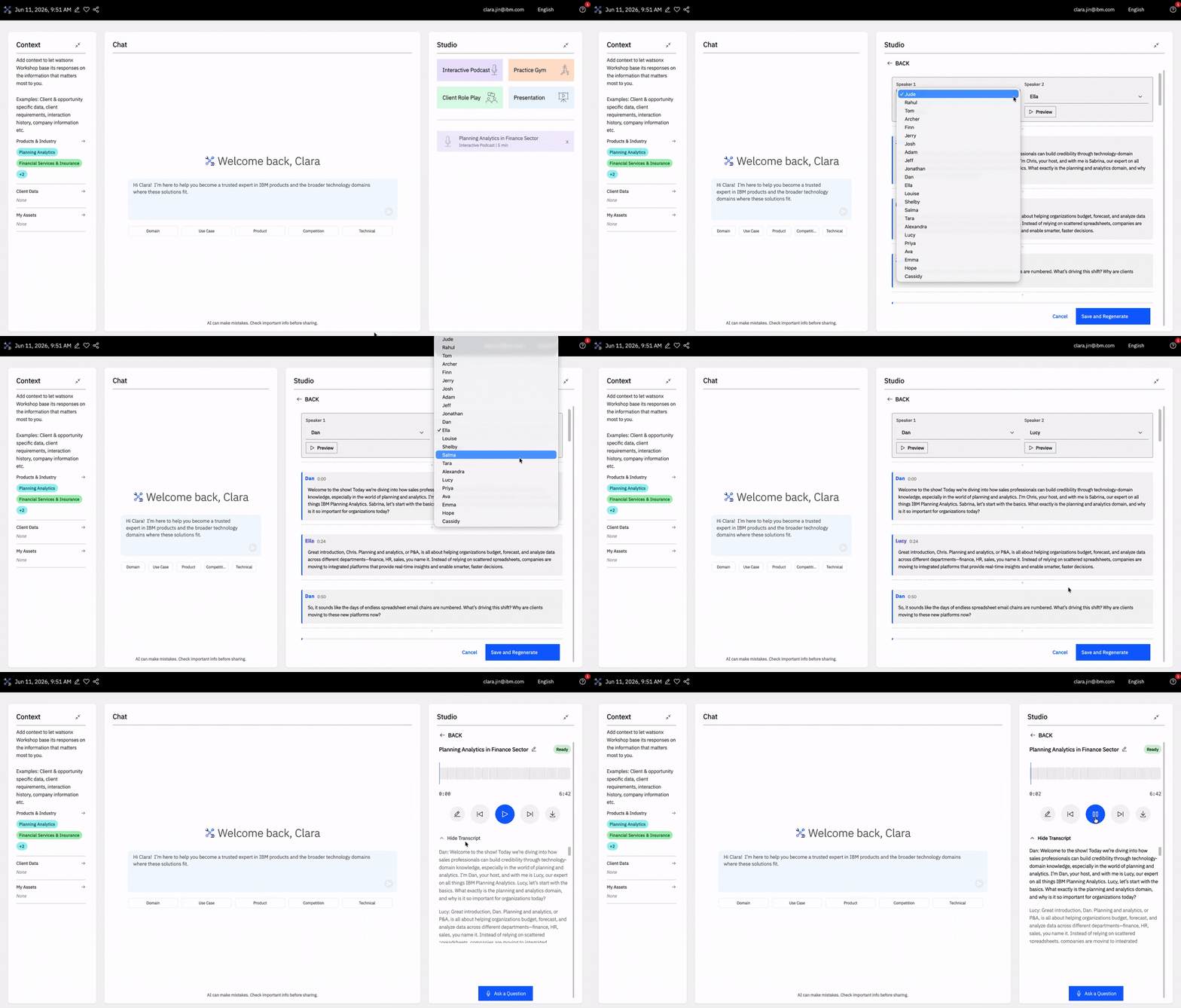
- Default Podcast Voices 🗣️ You can now set your preferred podcast voices directly from My Profile. Navigate there by clicking your email in the navigation bar, head to Preferences, and update your Default Podcast Voices. Click the Play icon next to the dropdown to preview a voice. Your selection will automatically apply to all new Interactive Podcast.
- Better Fact Check 🔎 We’ve improved our Fact Check capabilities to ensure responses are more grounded, so you can use watsonx Workshop with greater confidence.
Release 1.12 (04/06/2026): The One Where You Can Drag & Drop
As we continue building new capabilities, this release focuses on improving the experience you already know and love. With bug fixes, performance enhancements, and a new feature to making navigating watsonx Workshop even easier.
- Drag and Drop 📥 You can now drag and drop files into the Chat which will automatically be uploaded into My Assets in the Context panel.
- Bug Fixes 🐝 We’ve improved the Interactive Podcast Q&A and fixed an issue that prevented submitted questions from receving responses.
Release 1.11 (13/05/2026): The One Where Client Role Play Has It All
This week, we’re introducing new ways to practice and improve within watsonx Workshop. All previously marked “Coming Soon” modes in Client Role Play are now fully available, users can now directly submit feature requests to the team, and Skills improvement experiences are now available to help strengthen expertise and client engagement readiness.
Client Role Play
It now has all modes, giving you the ability to practice every stage of the sales conversation in watsonx Workshop:
- Warm Follow-Up Call 📞 Reinforce initial outreach and confirm upcoming meetings while continuing to build rapport. Use this mode to keep prospects engaged, validate interest, and ensure momentum toward the discovery call.
- Solution Presentation 🧑🏫 Present tailored IBM solutions that address key client challenges and connect directly to business value. This mode is to practice showing why your approach is the best fit and gaining agreement to move forward to the next stage.
- Technical Demo 💻 Demonstrate how solutions work through practical, use-case-driven examples. Use this mode to practice addressing technical requirements, answering detailed questions, and building confidence with technical stakeholders.
- Negotiate & Close 💰 Navigate pricing, scope, and terms while reinforcing the value of your solution. Utilize this mode to practice handling objections, maintaining value in negotiations, and securing commitment from the client.
- Confirm Value & Explore Expansion 🔄 Review the impact of delivered solutions and validate the value achieved. This mode is used to strengthen client relationships and identify opportunities for expansion or additional solutions.

Platform Enhancements
We’ve introduced additional enhancements to make watsonx Workshop more flexible and better support your workflows:
- Feature Request 🗳️ You can now submit feature requests through the Help icon located on the top right, the Help chatbot, or in the Wiki FAQs.
- Bug Fixes 🐝 We’ve also improved Skills, enhancing your session experiences.
Release 1.10 (29/04/2026): The One Where You Can Present
In this release, Client Role Play continues to evolve, and Interactive Podcast had an upgrade. We’ve also introduced new improvements to enhance how you use watsonx Workshop.
- Presentation in Client Role Play 🧑🏫 In the Custom Scenario mode for Client Role Play, there is a new one-directional mode. Unlike the other modes, Presentation doesn’t have an AI persona responding; the focus is entirely on your delivery. There’s even a live audience feature that brings a realistic presentation environment to your practice. You’ll be able to customize your own grading rubric, then upload or record a video delivering the presentation. watsonx Workshop will grade your presentation based on the rubric.
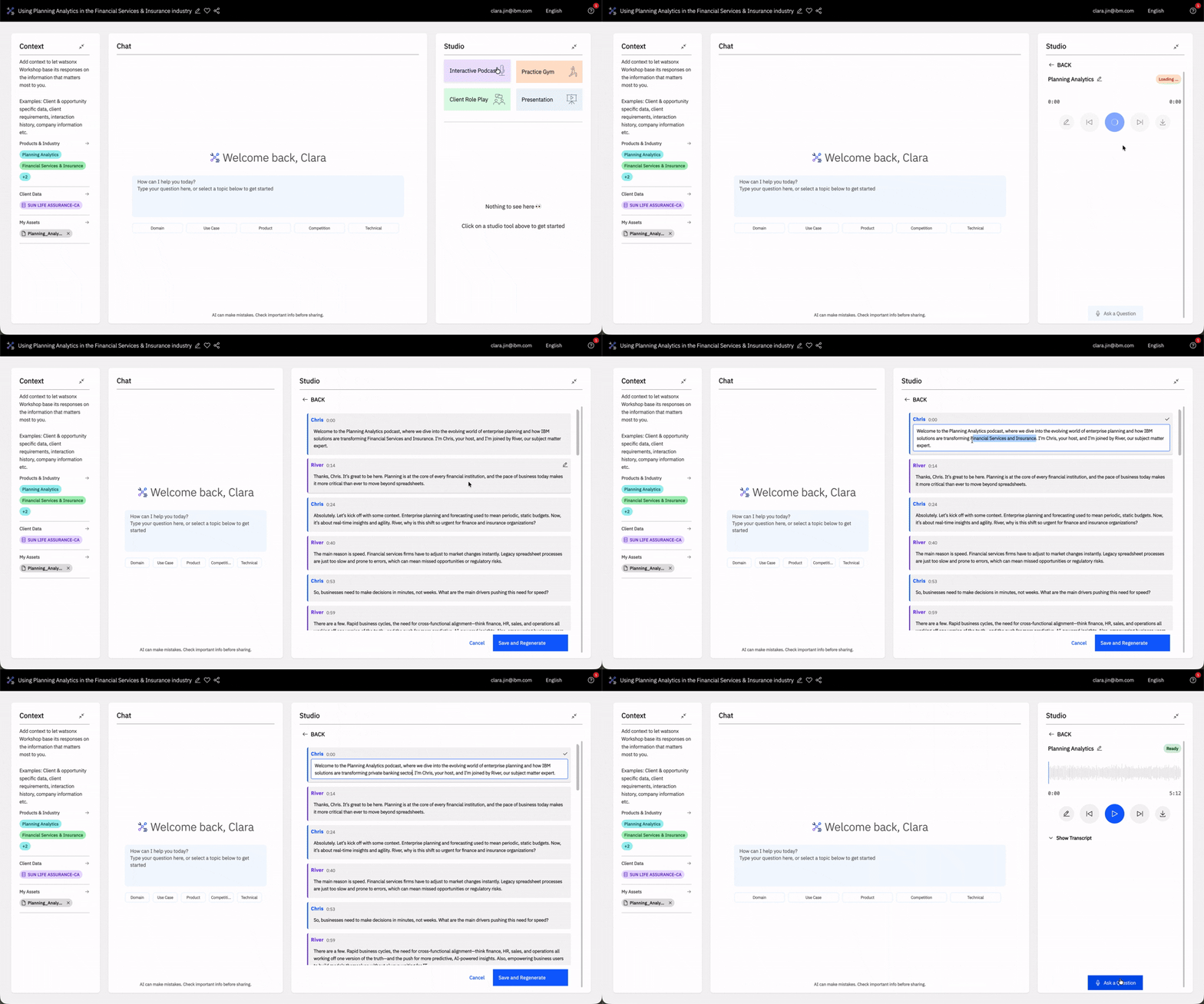
- Edit & Regenerate Podcast 🎧 You can now edit podcast transcripts and regenerate audio. Click on the pencil icon next to the media control icons to make quick adjustments to wording, tone, or content without starting from scratch. watsonx Workshop will regenerate the podcast audio based on your revised transcript, making it easier to refine and iterate on your message.
- Bug Fixes 🐝 We’ve made a bunch of bug fixes and improvements to upgrade your overall experience.
Release 1.9 (17/04/2026): The One Where We Support Firefoxs
For this week’s release, we expanded our browser support and made changes to improve your watsonx Workshop experience:
- Firefox Support 🦊 watsonx Workshop now supports Firefox, expanding browser compatibility.
- Bug Fixes 🐝 We’ve made a number of bug fixes: Practice Gym audio will register correctly, its question generation and grading logic are fixed; session-specific personas will generate accordingly for your Custom Scenario in Client Role Play.
Release 1.8 (10/04/2026): The One Where Client Role Play Got a New Look
This release introduces a massive overhaul of Client Role Play, a refreshed Context layout, improved flexibility for managing sessions, context, and workspace panels:
Client Role Play
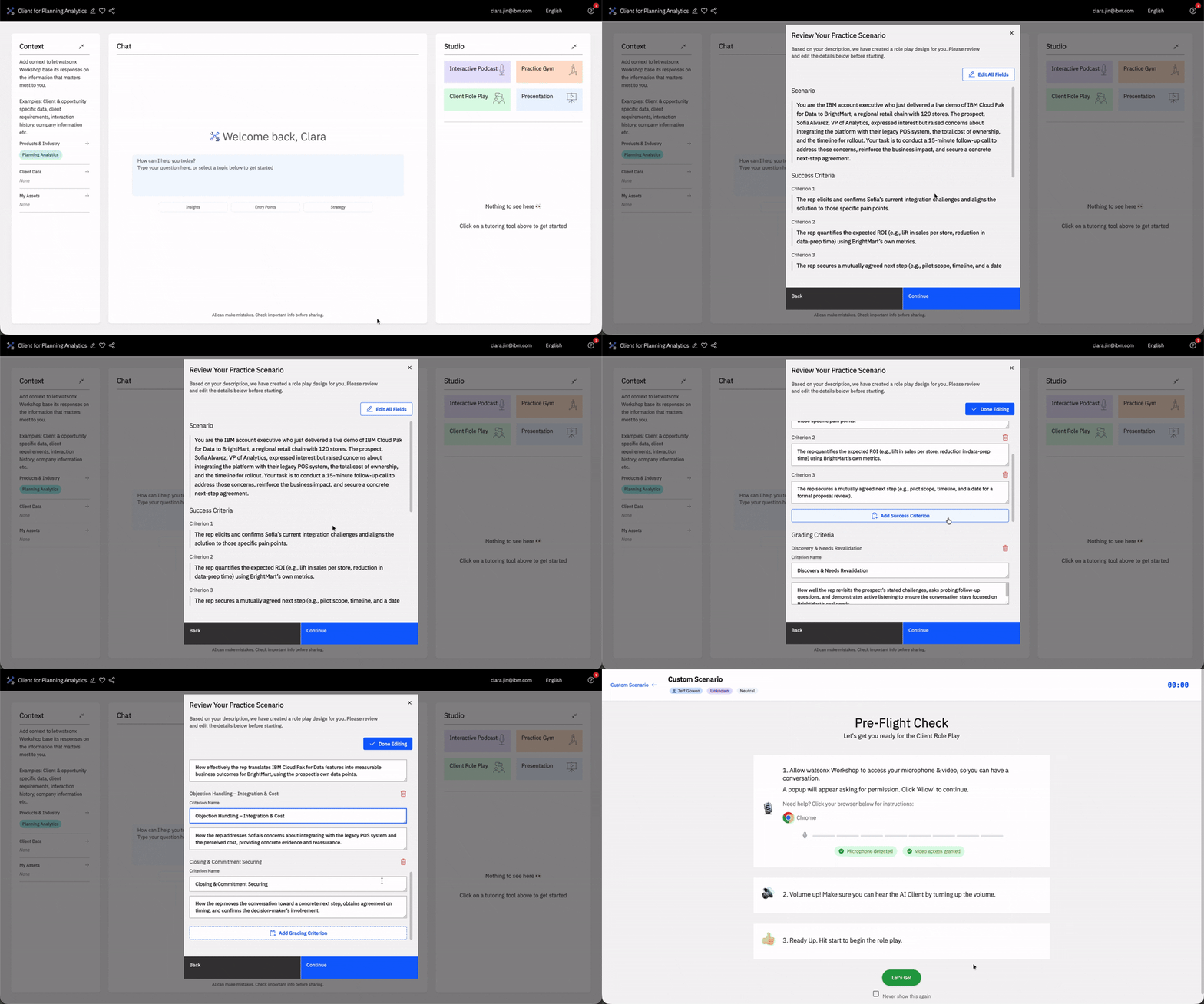
- A Refreshed Client Role Play ✨ When you open Client Role Play in your session, a new pop-up will appear. You’ll find options to practice a variety of scenarios or build your own, with more to come in the future. You can also edit the default grading rubrics found in pre-built scenarios.
- Custom Scenario 🛠️ You can now describe any sales scenario in Client Role Play and watsonx Workshop will generate a grading rubic that you can configure, dynamic conversation tree, and a persona. Custom Scenario will automatically be saved under the My Role Plays tab where you can reuse and manage it.
- Discovery Call 🔎 A new Client Role Play mode that’s focused on client needs assessment, BANT qualification, and closing for next steps.
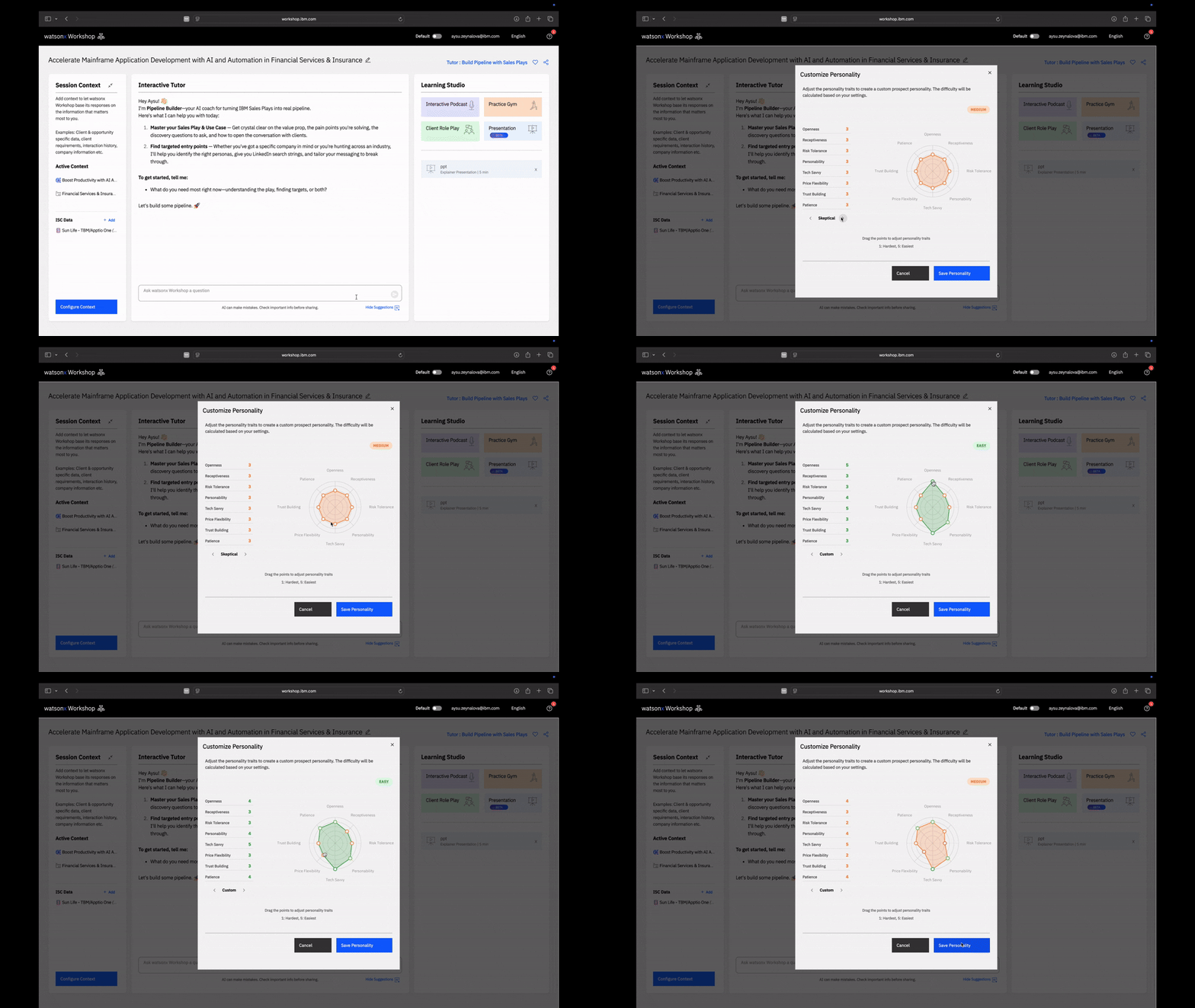
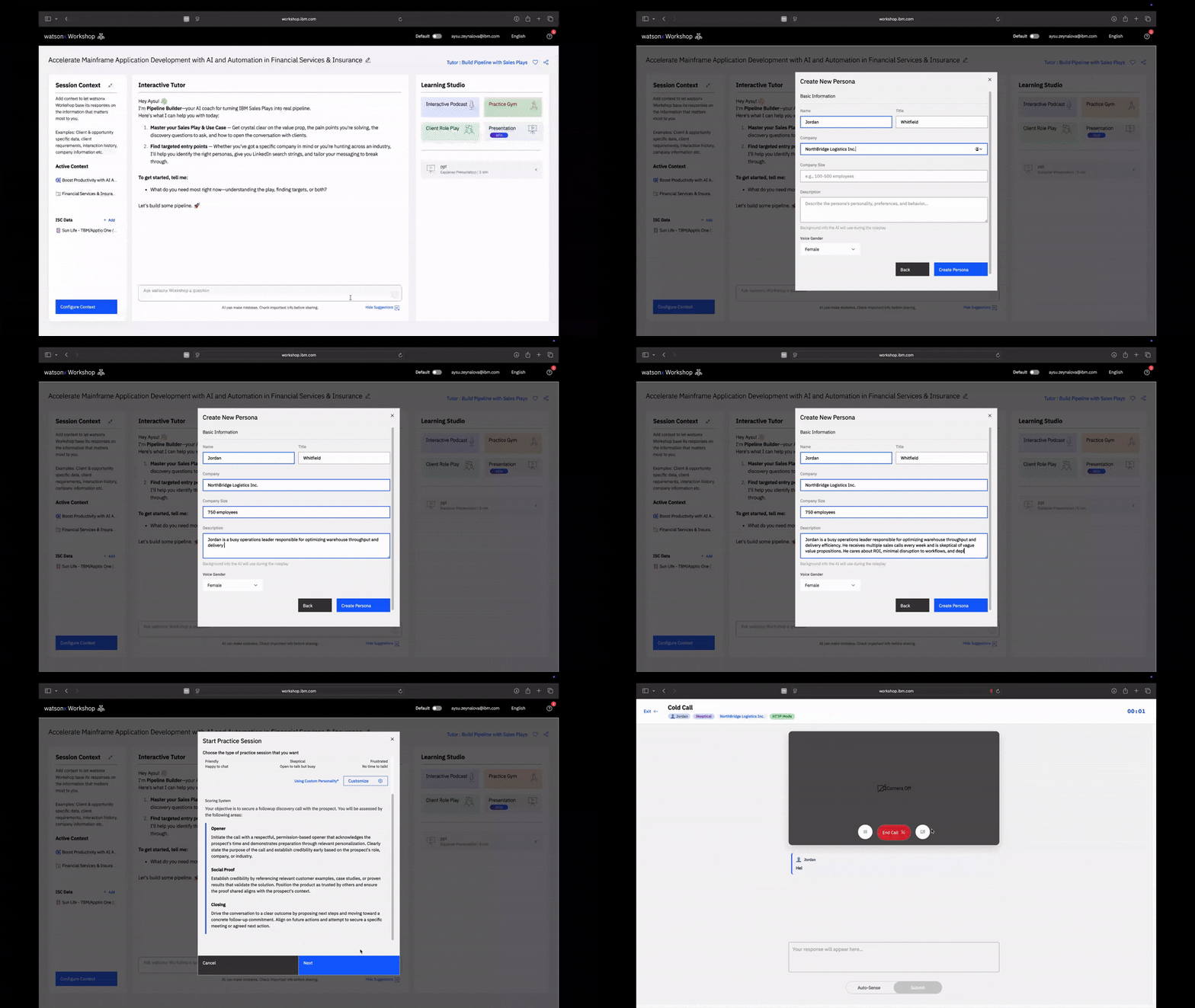
- Custom Persona in Client Role Play 🎭 You can build custom AI prospect personas with 8 adjustable personality traits using an interactive radar chart: Openness, Receptiveness, Risk Tolerance, Personability, Tech Savvy, Price Flexibility, Trust Building, and Patience.

UI Changes in Your Sessions
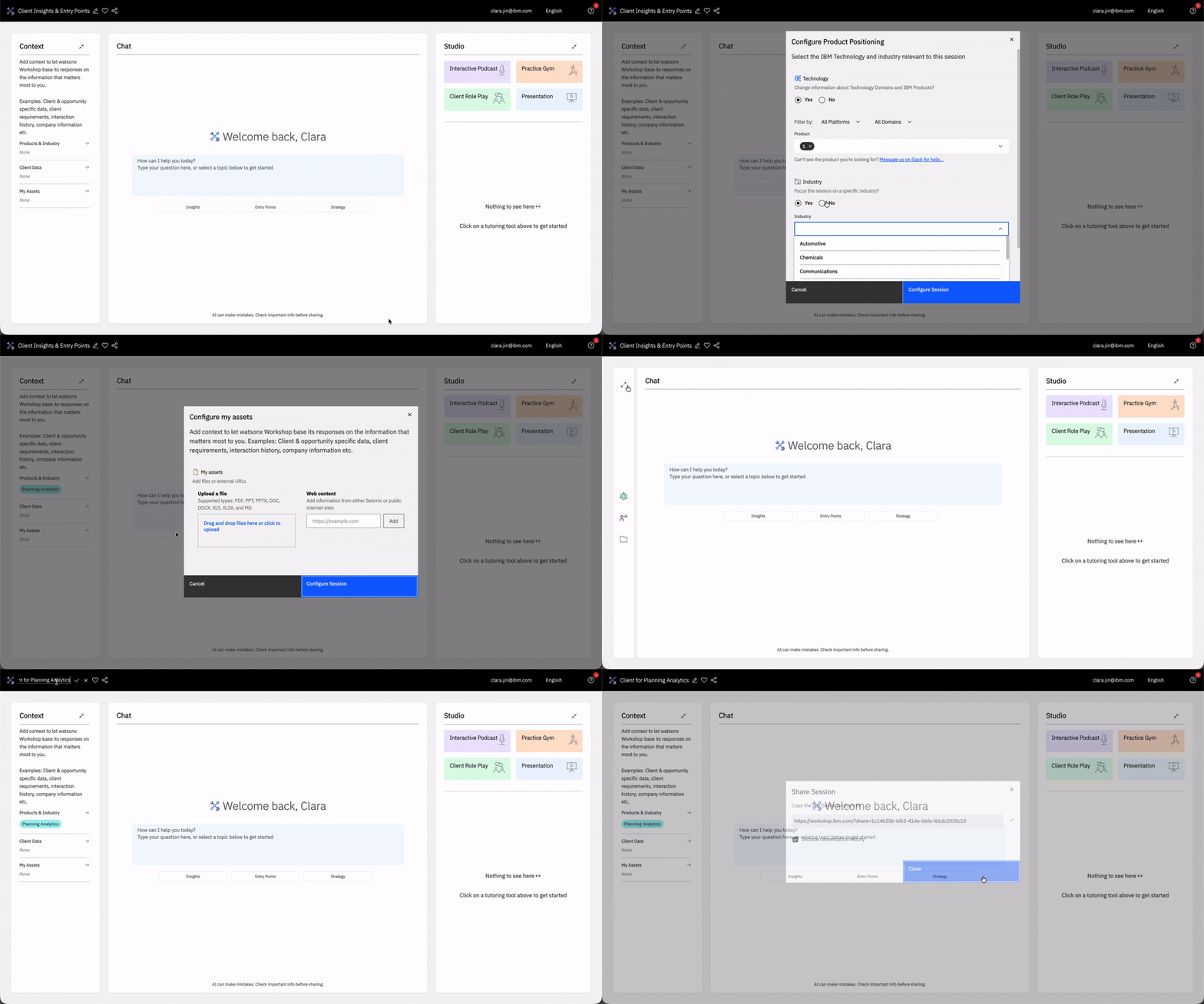
- New Context Panel UI 🎨 The Context panel had a refresh. You can now directly configure the following: Technology, Industry, Client Data which imports ISC, and My Assets where you upload your own documents. Tutor name, session sharing, and favoriting session now resides on the top right of the Chat panel.
- Minimize Panels 📦 You can now minimize the Context and Studio panels by clicking on the two arrows found on the top right corner.
Release 1.7 (27/03/2026): The One with Your Learning
Earlier this week, we brought you a powerful update that enables you to earn Your Learning hours during your watsonx Workshop sessions:
- Your Learning Integration 🎓 Your watsonx Workshop sessions are now integrated into Your Learning, with every session automatically tracked, updated every Saturday at 2:00 AM EST, and contributing to your Learning Hours. For more details on how activity is tracked and accounted for Learning Hours, visit the Your Profile & Learning Analytics page.
Release 1.6 (20/03/2026): The One with All the Skills!
To start out this month’s batch of releases, we’ve made major upgrades to our agent responses with skills that can be found under the textbox and the data behind it:
- Skills 🧮 In every session, there’s pre-defined agent skills that helps you discover the key use cases that each agent has and makes it faster to get value - generating what you need with just a few clicks.
- Smarter Agents 🤖 We’ve added a reasoning layer to ensure agent responses are better, grounded, and hallucinates less. Now, you can create a podcast within the Chat.
- Better Data 📊 Behind the agent responses, now has better and more recent up-to-date data that our agent has access to. Additionally, we’ve added new products under the Databases and Power domain, changed or removed products under Business Analytics, Assest Life Cycle Management, Data Intelligence, Data Integration, Technology Lifecycle Services, AI Assistants, AI Tools, Application Development, Application Integration, Workflow Automation, Power, Storage, IBM zStack, IBM Z EcoSystem, IBM z, IT Operations Management, IT Financial Management, Public Cloud Platform, and Application and Data Management.
- Bug Fixes 🐝 We’ve made some bug fixes - you’ll find Podcast under the Learning Tools to be a bit faster.
Release 1.5 (28/02/2026): The One with IBM Docs
In this week’s release, we’ve worked hard to bring you a massive update to expand watsonx Workshop’s dataset into the technical field:
- IBM Docs Integration 💻 By incorporating IBM Docs, you can now ask watsonx Workshop technical questions specific to the product you selected at the start of your session.
- Web Content & Seismic Integration 🌐 In every session, you can now add websites or Seismic links as a context.
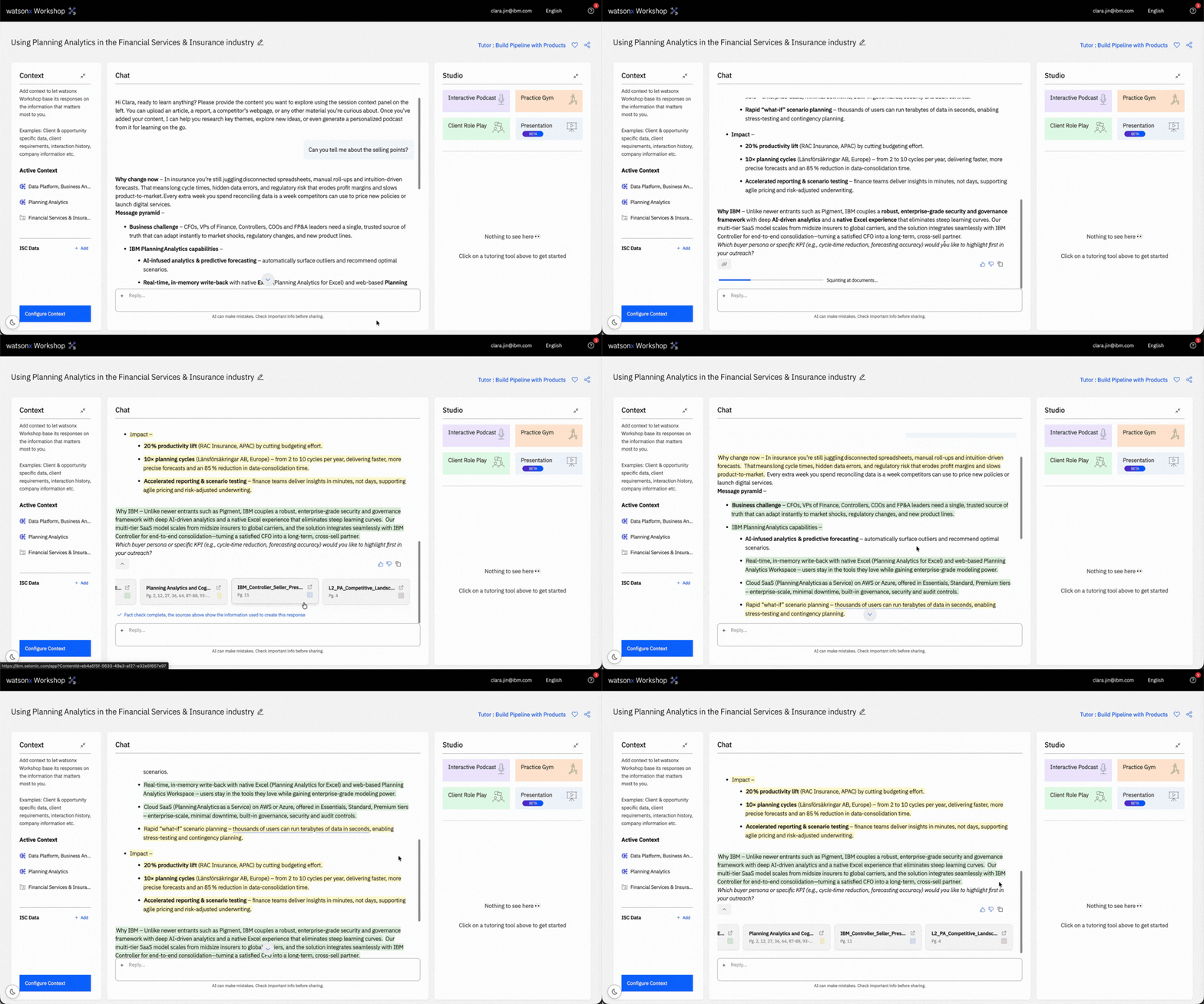
- Enhanced Citations 🗂️ Fact checking capabilities are now in watsonx Workshop. We’ve added more specific citations to our data sourcing, improving data transparency and reliability.
- Navi Integration ⚙️ Improved technical details for Hashicorp and Red Hat products.
- Improved Practice Gym 🏋 You can now specify topics that you want to focus on in your Practice Gym sessions, enhancing the overall experience and making it personalized to your needs.
- Multi Select Session Deletion 🗑️ Instead of individually deleting sessions, you can now multi-select sessions and delete it in one go.

- Mermaid Diagrams in Presentation 📊 You can now have mermaid diagrams in your generated presentation.
Release 1.4 (20/02/2026): The One With a More Powerful Web Search
For this week’s release, we’ve brought you a few improvements to features and enhance your experience with watsonx Workshop:
- A Significantly More Powerful Web Search 🔍 watsonx Workshop now has a faster real-time web search capabilities. You can now do deep research on accounts and even find contacts directly in Workshop. Try out these prompts:
- “What was Bank of America’s 2025 Q3 earnings reports and what are the expected goals and initiatives they are taking?”
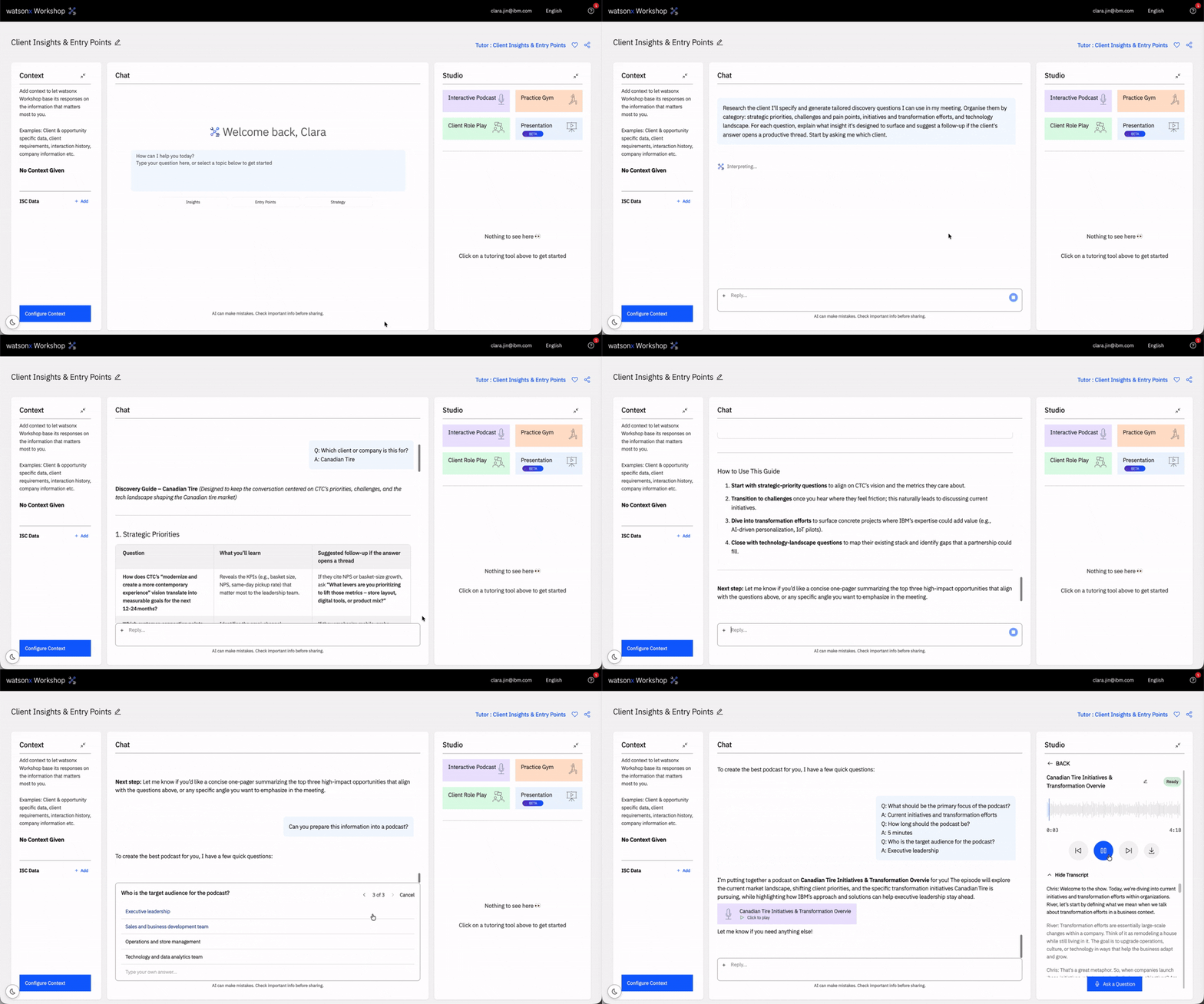
- “Run a full web search on Canadian Tire, provide me everything I need to know such as what's driving their business, strategic priorities, strongest entry points, discovery questions, and a full account deep-dive.”

- Enhancements ✨ We’ve made document uploads significantly faster and platform improvements.
Release 1.3 (13/02/2026): The One with Client Entry Points
For this release, we’ve worked hard and brought you many improvements and fixes. These are the improvements, along with a new feature:
- Clients Insights & Entry Points 💡 A new tutor can be found when you create a new session. Use it to uncover insights about accounts and identify client entry points for new opportunities. It’s designed to help you build compelling, client-focused value propositions that resonate. Check out this video that showcases how to get deep client research and specific contacts to reach out to in Workshop!
- Delete Role Plays and Practice Gym Sessions 🗑️ You can now delete your Client Role Play and Practice Gym sessions.
- Processing Status When You Ask a Question in Podcast ⏳ You’ll now see a processing status indicator in the Interactive Tutor when you ask a question. A clear visual signal that lets you know your question is actively being processed.
- Bug Fixes 🐝 We’ve made a number of bug fixes as well, such as presentation menu screen should now load faster.
Release 1.2 (06/02/2026): The One Where They All Have It and Bob
In this release, we’ve made changes, improvements, and fixes to enhance your watsonx Workshop experience:
- All Tools for All Tutors 🛠️ Every Studio tools is now available for all tutors. You are no longer limited to a specific tutor to access the Client Role Play or the Practice Gym.
- Bob is Here 🤖 Bob is now available in watsonx Workshop. You can find Bob under Product when you get started with a tutor of your choosing.
- Unlimited Files Support 🗳️ watsonx Workshop now supports unlimited file uploads up to a total of 500MB when you’re configuring your context in your sessions. Note that each file is restricted to a max of 30MB - you can try compressing your file to work around this! Let watsonx Workshop help you parse through your files and curate your session to your exact needs.
- Markdown File Support 📝 watsonx Workshop now supports .md files.
.gif)
- Last Updated Context 🔎 In your Session Context panel, you can now hover over contexts and a popup will display when the information was last updated.
Along with these improvements, we’ve made additional bug and security refinements to improve your sessions.
Release 1.1 (23/01/2026): The One with the 4 Big Features
The first release as watsonx Workshop brings four huge changes to improve your experiences. It’s been a minute since our last update, so hold on tight as we explain what’s new and improved:
- Build Pipeline with Sales Plays 📈 Start a session with the Sales Play tutor, select the play and use case, and watsonx Workshop will help you position the play to your target clients.

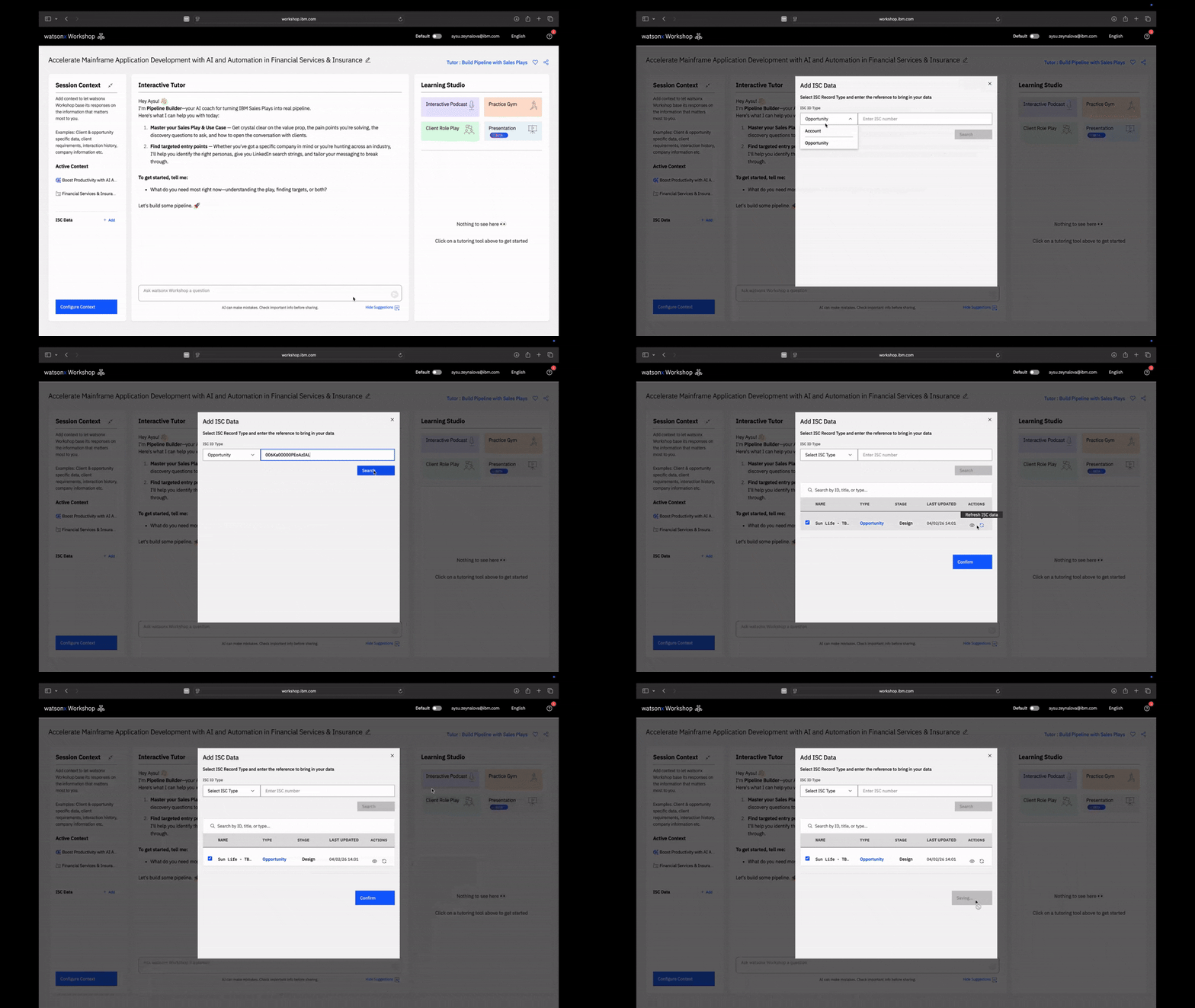
- ISC Integration 🧮 automatically pulls relevant ISC account and opportunity data directly into your session, giving watsonx Workshop more context to help you prospect, progress, or close your deals.
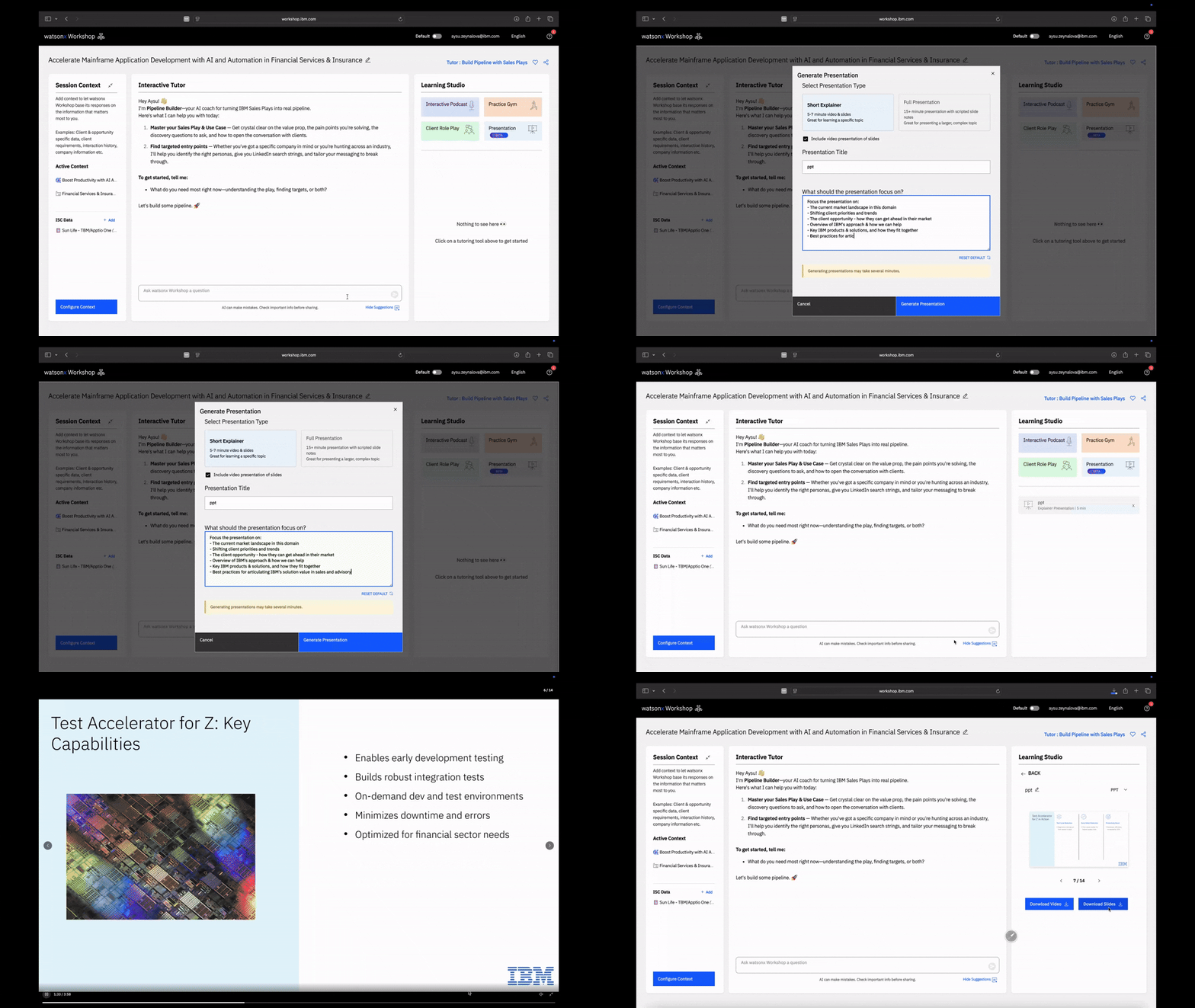
- Presentation Creator 🛠️ By popular demand, you can now create AI generated presentations with explainer videos and downloadable PowerPoint slides. Great for short explainers to detailed client presentations.
- Client Role Play 🎭 has been overhauled to enhance your conversation experience. You can even create your custom personas to better prepare for specific client conversations.
Additional Improvements:
- Pin and Unpin Sessions 📌 Keep important sessions easily accessible by pinning them to the top of your list.

- Drag and Drop Sessions 🧩 Reorganize your sessions with simple drag-and-drop actions for a cleaner, more personalized workspace.

Release 1.0 (05/01/2026): The One That Changed It All
We’re excited to announce that the Beta has now concluded, and we are officially live as watsonx Workshop! In this release, we’ve made a number of enhancements to scale a larger number of users. Additionally, uploading documents is 10x faster than before.
Release 0.11 (22/12/2025): The One with the Tutorial
Expand for Details
In this release, we made some updates to improve your experience:
- Uploading Documents 📑 is now faster and more accurate with improvements in how watsonx Workshop uses the information in your uploaded documents.
- New In-App Tutorial 🎓 shows how you to use the key features in watsonx Workshop, especially helpful for new users getting started.
Release 0.10 (12/12/2025): The One with the Fresh Studio
Expand for Details
For this release, we’ve brought you a big design update to the Studio and improvements:
- Multiple podcasts episodes 🎙️ You can now generate multiple podcasts episodes in 1 session, allowing you to get the most out of a single session.
- Podcast Transcripts 📖 Podcasts now have a transcript available for those who prefer to read as you listen.
- Role Play & Practice Gym History 🧐 Your Role Play & Practice Gym sessions will also show in your list, so you can review feedback from past sessions.
- Bug fixes & Refinement 🐛 We’ve made a bunch of bug fixes and improvements, including a more refined web search and better handling of client references.
Look at the new UI - check it out on watsonx Workshop today!
Release 0.9 (05/12/2025): The One with the Easier Prompting
Expand for Details
In this release, the following improvements have been implemented:
- New AI prompt suggestions 💡 you can now find these suggestions in the textbox when asking watsonx Workshop a question which will give you inspirations and speed up your interactions with the Tutor.
- New “Negotiate & Close Tutor” 🤝 helps you steer deals over the line. Prepare for negotiations, get feedback on your close plan, or use watsonx Workshop to create a Close Plan from scratch. You can find this in a list of tutors when you create a session.
- Asking a question in the podcast 🎙️ is now much faster with near instant responses to help streamline your experience and feel as authentic as possible.
- Context indicator now shows when you’re uploading documents 📑, so you can know how much space you have left.
- You can now copy tables 📊 while maintaining its format or copy tables as an image and paste into documents.
Release 0.8 (11/11/2025): The One with the Agentic Tutor & Web Search
Expand for Details
In this release, the new agentic tutor is here! It’ll be bringing more sophistication and more data to your watsonx Workshop experience. Here are the features in the new tutor:
- Web Search 🌐 Use the latest client insights, including news, initiatives, and business priorities as you’re building pipeline & progressing deals.
- IBM Portfolio knowledge in every session 🗄️ You can now use watsonx Workshop for multi-product use cases, like a cross-domain RFP.
- Public Case Studies 💼 Get more relevant client references from our public case study library.
- Source Referencing 🔍 Enhanced citations of source information used to construct responses.
Plus, a bonus feature:
- Longer podcasts 🎙️ You can now generate longer podcasts of up to 15 minutes and use the duration slider for more control over the length of your interactive podcasts.
Release 0.7 (24/10/2025): The One with the Tutor Feedback
Expand for Details
As we continue to work on the agentic tutor with new data sources, we’ve brought a smaller update to you:
- Tutor Feedback 📝 You can now provide feedback on each tutor message with a thumbs up or down, enhancing future responses.
- Multi-Language Support 🌐 Improved handling of multilingual context to ensure accurate translations across materials.
Additionally, a few bug fixes:
- Uploading multiple documents
- Autosense in Role Play
Release 0.6 (20/10/2025): The One with 32 Languages
Expand for Details
A big update to our non-English native speakers! watsonx Workshop is now multi-lingual and available in 32 languages (including English):
- Arabic (Saudia Arabia, UAE)
- Bulgarian
- Croatian
- Czech
- Danish
- Dutch
- Filipino
- Finnish
- French (Canada, France)
- German
- Greek
- Hindi
- Hungarian
- Indonesian
- Italian
- Japanese
- Korean
- Malay
- Mandarin (Simplified Chinese)
- Norwegian
- Polish
- Portuguese (Brazil, Portugal)
- Romanian
- Russian
- Slovak
- Spanish (Mexico, Spain)
- Swedish
- Tamil
- Turkish
- Ukrainian
We understand the extra challenge of mastering a topic in a non-native language – we can’t even imagine how difficult a cold call must be so we’re really excited to bring this new feature for our colleagues around the world. Simply select your preferred language from the top menu bar (next to your email address).
Release 0.5 (02/10/2025): The One That Made Everything Faster
Expand for Details
In this release, we focused on finetuning watsonx Workshop ensuring it’s faster, more reliable, and making your sessions more productive:
- Better Formats in Tutor 📊 Tutor can now provide better formats, including tables and code windows.
- Faster Tutor 🎓 Increase in the Tutor response time, cutting down your wait times.
- Reliable Source Referencing 📑 Made source referencing more reliable, so you can be confident in what you’re bringing to the client.
- Improved Quiz Grading 💯 Quiz grading is less harsh such that questions you know should be marked correct.
- Faster Role Play 🤝 Role Play is faster/more responsive which allows you to be more immersed during your session.
Release 0.4 (17/09/2025): The One with the Session Sharing
Expand for Details
For this release, we’ve made some major improvements to watsonx Workshop:
- Session Sharing 🔗 You can now share your sessions with other users by clicking on the share icon in the session on the top right to get a shareable link. This shares everything in your session aside from chat history.
- More Document Formats 📄 watsonx Workshop now has expanded file support for the following file types: .docx, .ppt, .xlsx, .pdf.
- Regenerate Podcasts 🎙️ You can regenerate podcasts in the same session by providing a new podcast prompt.
- Role Play UI Changes 🎨 The company details pre-read before starting a call has a refreshed design.
Along with these major improvements, we also made various bug fixes and performance improvements to upgrade your watsonx Workshop experience.
Release 0.3 (04/09/2025): The One with All the Products
In our last update, we expanded watsonx Workshop’s product coverage when creating a session. For this update, we’re happy to announce that watsonx Workshop now supports all products.
Release 0.2 (05/08/2025): The One Where We Went Mobile
Expand for Details
In this release, we’ve made some key changes to make podcasts more accessible and cover more products when creating a session:
- Learn Anything Mode 💡 Allows you to create a podcast quickly from any document.
- Podcast on Mobile 📲 You can SMS yourself the podcast link and listen on the go – click on the download button after creating a podcast to use this feature.
- More Products on Demand 🔥 We’ve added more products including Storage products, Data Intelligence, Data Lakehouse, and Databases.
Release 0.1 (01/08/2025): The One That Started It All
Expand for Details
Our first update release where we’ve worked hard to bring you new features and fixes. In this release, the following improvements have been made:
- Document Upload 🗂️ is faster and more reliable. Use and learn with watsonx Workshop to get the most out of the updated experience.
- Deletion and Renaming Sessions ✏️ You can now delete and rename your previous sessions on the home screen.
- Improved Context in Podcast 🎙️ Podcast now does a better job of using your uploaded documents as context – creating more relevant and accurate podcasts.
- Deeper Source Referencing 🔍 Tutor responses now include deeper source references, with color-coded highlights that show exactly which sources support each part of the answer.
- Copy Text Button 📋 Tutor now includes a “Copy text” button so you can quickly copy and export the sections you need.
- Audio Input Level Meter 📊 Pre-flight checks now include a microphone level gauge for both quizzes and roleplays, so you can confirm your audio is picking up clearly before you begin.
- Clearer Role Play Exit 🚪 We’ve made it clearer how to end a roleplay, with more visible exit controls so you can wrap up anytime.
Feel free to share your feedback, suggestions, or questions in the #watsonx-workshop-feedback Slack channel. We appreciate your input and look forward to improving watsonx Workshop for you.
To learn more about creating a session, visit the Create a Session page. This will walk you through creating your first session – from choosing a tutor, setting the right context, and tailoring the experience to support your learning and preparation from the very beginning.