リリースノート
リリース 1.5 (2026年2月28日): IBM Docs 版
今週のリリースでは、watsonx Workshopのデータセットを技術分野に拡張するために、大規模なアップデートを行いました:
- IBM Docs統合 💻 IBM Docsを取り入れることで、セッション開始時に選択した製品に関する技術的な質問をwatsonx Workshopに直接尋ねることができます。
- WebコンテンツとSeismic統合 🌐 各セッションにおいて、ウェブサイトやSeismicのリンクをコンテキストとして追加できるようになりました。
- 引用の強化 🗂️ ファクトチェック機能がwatsonx Workshopに追加されました。より具体的な引用をデータ出典に追加し、データの透明性と信頼性を向上させました。
- ナビ統合 ⚙️ HashicorpやRed Hat製品の技術詳細情報が改善されました。
- 練習ジムの改善 🏋 練習ジムのセッションで焦点を当てたいトピックを指定できるようになり、体験を向上させ、個人のニーズに合わせてカスタマイズできるようになりました。
- 複数選択によるセッション削除 🗑️ 個別に削除していたのをやめて、複数のセッションを選択して一括削除できるようになりました。

- プレゼンテーションにおけるMermaidダイアグラム 📊 生成されたプレゼンテーションにMermaidダイアグラムを含めることができるようになりました。
リリース 1.13(2026/06/10):「音声の好み」に関する回
このリリースはパーソナライズがすべてです。Interactive Podcast の使い方を、聴く体験を思い通りに形づくるために、より多くのコントロールをあなたに提供します。
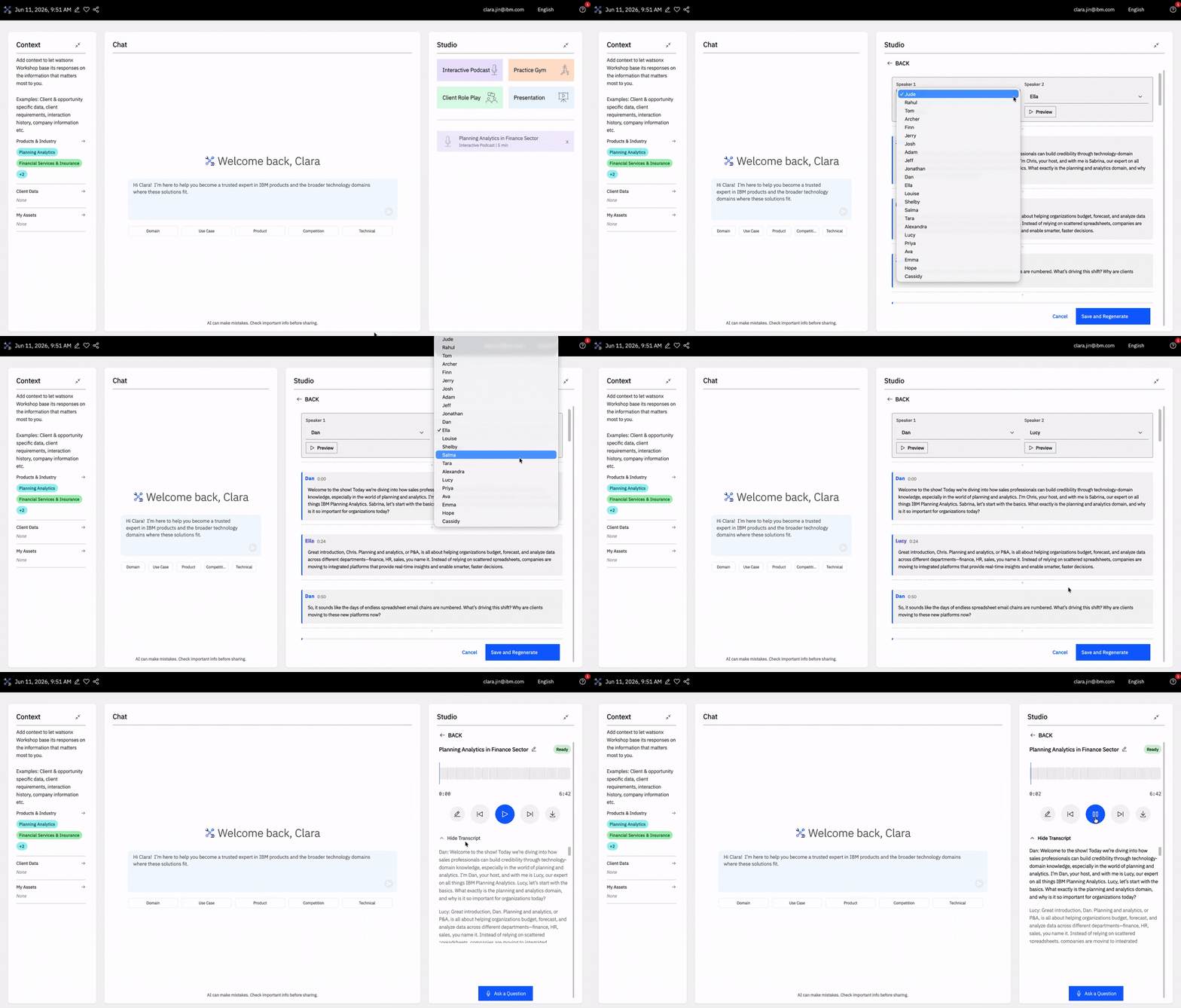
- ホストを選択 🎙️ Interactive Podcast では、ホストの多様な音声から選んで、聴く体験をパーソナライズできます。ポッドキャストが生成されたら、メディアプレーヤーの横にある Pencil アイコンをクリックし、トランスクリプトの上から希望する話者を選択します。コミットする前に Preview をクリックして音声を試し、その後 Save and Regenerate をクリックして変更を反映します。
- デフォルトのポッドキャスト音声 🗣️ これで、マイプロフィールから希望するポッドキャスト音声を直接設定できるようになりました。ナビゲーションバーのメールをクリックしてそこへ移動し、**設定(Preferences)に進み、デフォルトのポッドキャスト音声を更新します。ドロップダウンの横にある再生(Play)アイコンをクリックして音声をプレビューできます。選択した内容は、新しいすべてのインタラクティブ ポッドキャスト(Interactive Podcast)**に自動的に適用されます。
- より優れたファクトチェック 🔎 当社はファクトチェックの機能を改善し、回答がより根拠に基づくものになるようにしました。これにより、watsonx Workshop をより高い自信をもってご利用いただけます。
リリース 1.9(2026年4月17日):Firefoxをサポートする回
今週のリリースでは、ブラウザの対応範囲を拡大し、watsonx Workshop の体験を改善するための変更を行いました:
- Firefox 対応 🦊 watsonx Workshop は現在 Firefox に対応しており、ブラウザ互換性を拡大しました。
- バグ修正 🐝 複数のバグ修正を行いました:Practice Gym の音声が正しく登録されるようになり、その質問生成および採点ロジックを修正しました。また、Client Role Play の Custom Scenario に対して、セッション固有のペルソナがそれに応じて生成されるようにしました。
リリース1.6(2026/03/20):あらゆるスキルを持つ回!
今月のリリース第1弾として、テキストボックスの下にあるスキルと、その背後のデータに基づいて、エージェントの応答を大幅にアップグレードしました。
- スキル 🧮 すべてのセッションで、各エージェントが持つ主要なユースケースを見つけやすくし、わずか数クリックで価値を得るまでをより速くするための、あらかじめ定義されたエージェントスキルがあります。
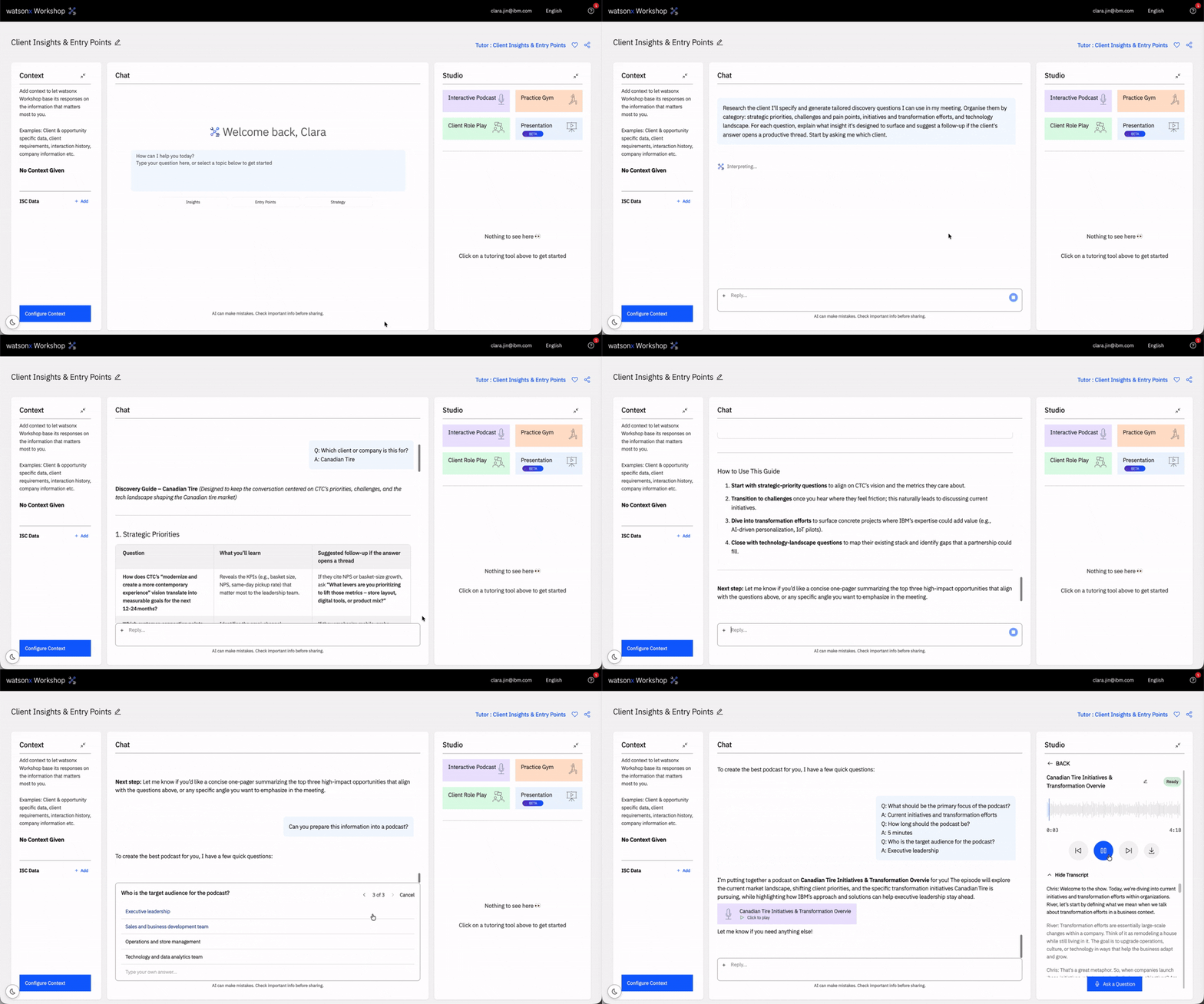
- より賢いエージェント 🤖 エージェントの応答がより良く、根拠に基づき、幻覚(ハルシネーション)をより少なくするために、推論レイヤーを追加しました。これで、Chat 内でポッドキャストを作成できます。
- より良いデータ 📊 エージェントの応答の裏側では、これまで以上に優れ、より最新のデータをエージェントが参照できるようになりました。さらに、Databases および Power ドメイン配下で新しい製品を追加し、Business Analytics、Assest Life Cycle Management、Data Intelligence、Data Integration、Technology Lifecycle Services、AI Assistants、AI Tools、Application Development、Application Integration、Workflow Automation、Power、Storage、IBM zStack、IBM Z EcoSystem、IBM z、IT Operations Management、IT Financial Management、Public Cloud Platform、Application and Data Management 配下の製品の変更または削除を行いました。
- バグ修正 🐝 いくつかのバグを修正しました。Learning Tools の「Podcast」が少し速くなっているのをご確認いただけます。
リリース 1.5(2026/02/28):IBM Docsの回
今週のリリースでは、watsonx Workshop のデータセットを技術分野へ拡張するための大規模なアップデートをお届けできるよう、入念に取り組みました:
- IBM Docs 連携 💻 IBM Docs を取り込むことで、セッション開始時に選択した製品に固有の watsonx Workshop の技術的な質問を、今まで以上に気軽に尋ねられるようになりました。
- Web コンテンツ & Seismic 連携 🌐 すべてのセッションで、コンテキストとして Web サイトや Seismic のリンクを追加できるようになりました。
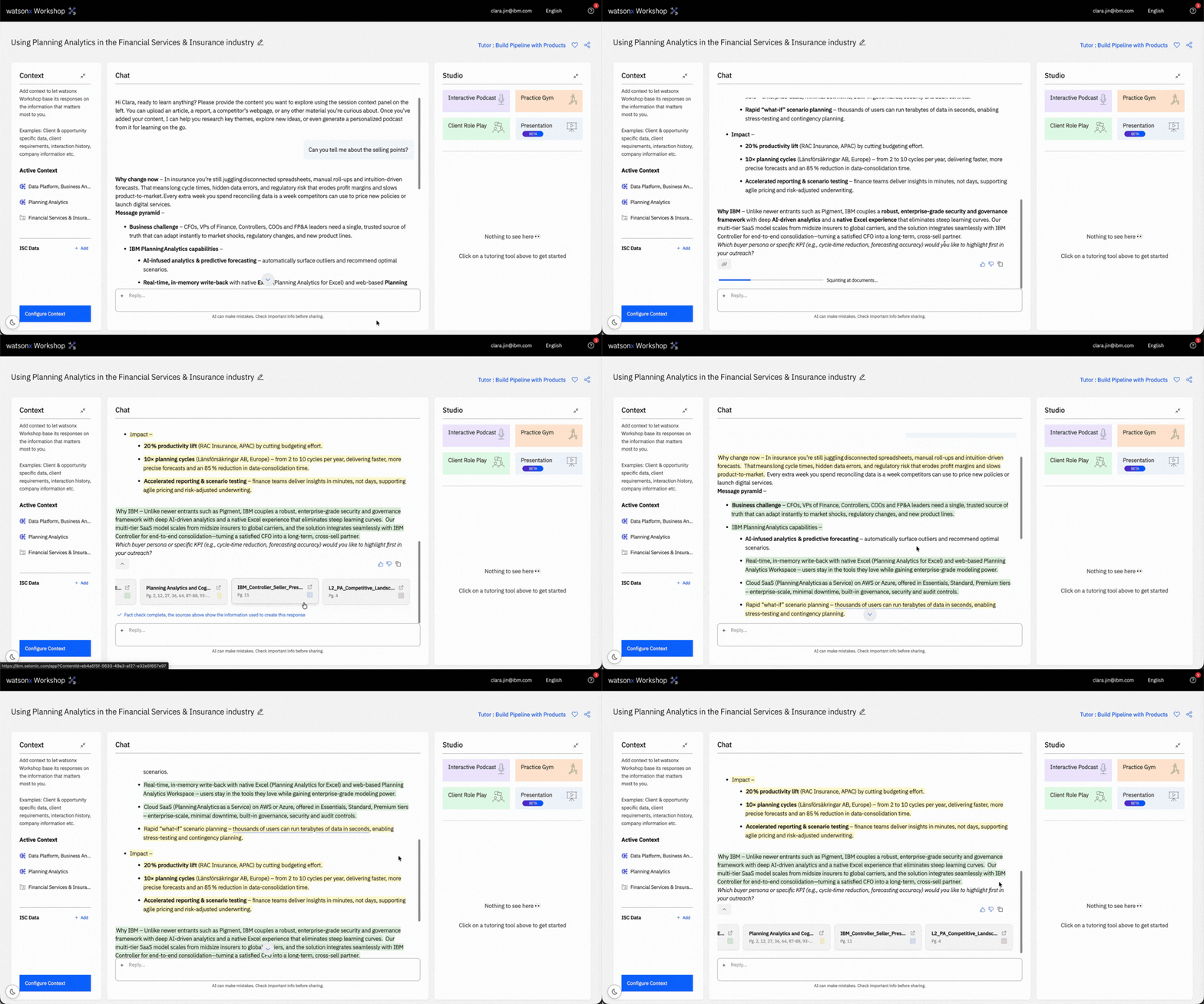
- 引用の強化 🗂️ ファクトチェック機能が watsonx Workshop に搭載されました。データの出典に、より具体的な引用を追加し、データの透明性と信頼性を高めています。
- Navi Integration ⚙️ Hashicorp および Red Hat 製品の技術詳細を改善しました。
- Improved Practice Gym 🏋 Practice Gym セッションで注力したいトピックを指定できるようになりました。これにより、全体的な体験が向上し、ニーズに合わせてパーソナライズできます。
- Multi Select Session Deletion 🗑️ セッションを個別に削除する代わりに、複数のセッションを選択して一括で削除できるようになりました。

- プレゼンテーションでの Mermaid 図 📊 生成したプレゼンテーションに mermaid 図を追加できるようになりました。
リリース 1.2 (2026/06/02): みんながそれを持っているやつとボブについて
このリリースでは、皆様のwatsonxワークショップ体験を向上させるために、変更点、改善点、および修正を行いました:
- すべてのチューター向けのすべてのツール 🛠️ すべてのStudioツールがすべてのチューターで利用可能になりました。もう特定のチューターに限定されることはありません。クライアントロールプレイや練習ジムにアクセスできます。
- ボブが登場 🤖 watsonxワークショップにボブが登場しました。チューターを選んで開始するとき、「製品」セクションの下にボブを見つけることができます。
- 無制限のファイルサポート 🗳️ watsonxワークショップは、セッション中にコンテキストを設定する際に、総合で最大500MBまで無制限のファイルアップロードをサポートします。ただし、各ファイルは最大30MBに制限されています。圧縮して回避することも可能です! watsonxワークショップを利用して、あなたのファイルを解析し、セッションをあなたのニーズに合わせてキュレーションしましょう。
- Markdownファイルのサポート 📝 watsonxワークショップは、.mdファイルをサポートしています。
.gif)
- 最終更新済みのコンテキスト 🔎 セッションコンテキストパネルで、コンテキストにカーソルを合わせると、情報が最後に更新された日時がポップアップで表示されるようになりました。
これらの改善に加えて、セッションのパフォーマンス向上のために、バグ修正やセキュリティの微調整も行いました。
リリース 0.11 (2025年12月22日): チュートリアル版
詳細を展開してください
このリリースでは、あなたの体験を向上させるためにいくつかのアップデートを行いました:
- ドキュメントのアップロード 📑 がより高速で正確になり、watsonx Workshopがアップロードされたドキュメントの情報を利用する方法が改善されました。
- 新しいアプリ内チュートリアル 🎓 は、watsonx Workshopの主要な機能の使い方を示しており、特に初心者の方が始めるのに役立ちます。
リリース 0.10 (2025年12月12日): The One with the Fresh Learning Studio
詳細について詳しく説明してください。
このリリースでは、学習スタジオの大規模なデザイン更新と改善を行いました:
- 複数のポッドキャストエピソード 🎙️ これまで1回のセッションで複数のポッドキャストエピソードを生成できるようになり、1回のセッションを最大限に活用できます。
- ポッドキャストのトランスクリプト 📖 ポッドキャストにトランスクリプトが利用可能になり、聴くときに読むのを好む方に便利です。
- ロールプレイ&練習ジムの履歴 🧐 ロールプレイ&練習ジムのセッションもリストに表示されるため、過去のセッションからのフィードバックを振り返ることができます。
- バグ修正と改良 🐛 より洗練されたウェブ検索やクライアントリファレンスの扱いなど、多数のバグ修正と改善を行いました。
新しいUIをぜひご覧ください - 今日のwatsonxワークショップでチェックしましょう!
リリース 0.9 (2025年5月12日): より簡単なプロンプトのもの
詳細について詳しく説明してください。
このリリースでは、以下の改善が実施されました:
- 新しいAIプロンプトの提案 💡 質問をwatsonxワークショップに投げるときにこれらの提案をテキストボックスで見つけることができ、インスピレーションを得たり、チューターとのやり取りをスピードアップしたりできます。
- 新しい「交渉・クロージングチューター」 🤝 取引をまとめるのに役立ちます。交渉の準備をしたり、クロージングプランに対するフィードバックをもらったり、watsonxワークショップを使って最初からクロージングプランを作成したりできます。セッション作成時にチューターのリストから見つけることができます。
- ポッドキャストで質問する 🎙️ 今では、ほぼ即座に返答が得られ、体験を効率化し、できるだけ本物のように感じられるようになっています。
- コンテキストインジケーター 📑 ドキュメントをアップロードしているときにこれが表示され、残りのスペースを知ることができます。
- 表をコピーできるようになりました 📊 フォーマットを維持したままコピーしたり、表を画像としてコピーしてドキュメントに貼り付けたりできます。
リリース 0.10 (2025/12/12): ザ・ワン・ウィズ・ザ・フレッシュ・スタジオ
詳細について詳しく説明してください
このリリースでは、スタジオの大規模なデザイン更新と改善を行いました:
- 複数のポッドキャストエピソード 🎙️ これまで1回のセッションで複数のポッドキャストエピソードを生成できるようになり、1つのセッションから最大限に活用できます。
- ポッドキャストのトランスクリプト 📖 ポッドキャストには、聴きながら読むことを好む方のためにトランスクリプトが利用可能になりました。
- ロールプレイ&練習ジムの履歴 🧐 ロールプレイ&練習ジムのセッションもリストに表示され、過去のセッションからのフィードバックを確認できます。
- バグ修正&改善 🐛 より洗練されたウェブ検索やクライアントリファレンスの処理を含む、多くのバグ修正と改善を行いました。
新しいUIをぜひご覧ください — todayのwatsonx Workshopでチェックしてください!
リリース 0.7 (2025年10月24日): チューターのフィードバックとともに
詳細について詳しく説明する
新しいデータソースを使用したアジェンティック・チューターの開発を続ける中で、小さなアップデートをお届けします:
- チューターのフィードバック 📝 各チューターのメッセージに対して、親指を上げるまたは下げることでフィードバックを提供できるようになり、今後の応答を改善します。
- 多言語サポート 🌐 多言語のコンテキストの取り扱いを改善し、資料全体で正確な翻訳を確保します。
また、いくつかのバグ修正も行いました:
- 複数のドキュメントのアップロード
- ロールプレイ中の自動認識機能
リリース 0.6 (2025年10月20日): 32の言語を持つザ・ワン
詳細について展開してください。
私たちの非英語話者の皆さんへの大きなアップデート!watsonxワークショップは、現在多言語対応になり、32の言語(英語を含む)で利用可能です:
- アラビア語(サウジアラビア、UAE)
- ブルガリア語
- クロアチア語
- チェコ語
- デンマーク語
- オランダ語
- フィリピン語
- フィンランド語
- フランス語(カナダ、フランス)
- ドイツ語
- ギリシャ語
- ヒンディー語
- ハンガリー語
- インドネシア語
- イタリア語
- 日本語
- 韓国語
- マレー語
- マンダリン(簡体中国語)
- ノルウェー語
- ポーランド語
- ポルトガル語(ブラジル、ポルトガル)
- ルーマニア語
- ロシア語
- スロバキア語
- スペイン語(メキシコ、スペイン)
- スウェーデン語
- タミル語
- トルコ語
- ウクライナ語
非母国語でトピックをマスターすることの難しさは理解しています。コールの難しさは想像もつきません。私たちは、この新機能を世界中の同僚の皆さんに提供できることに非常に興奮しています。画面上のメニューバー(メールアドレスの隣)から、希望の言語を選択してください。
リリース 0.5 (2025年2月10日): すべてを高速化したもの
詳細について詳しく説明してください。
このリリースでは、watsonxワークショップの微調整に焦点を当て、より高速で信頼性が高く、セッションをより生産的にしています:
- より良いフォーマットをTutorに 📊 Tutorは、テーブルやコードウィンドウなど、より良いフォーマットを提供できるようになりました。
- より高速なTutor 🎓 Tutorの応答時間が向上し、待ち時間を短縮します。
- 信頼性の高いソース参照 📑 ソースの参照をより信頼できるものにし、クライアントに提示する情報に自信を持てるようになりました。
- 改善されたクイズの採点 💯 クイズの採点がやさしくなり、正しいべき質問を正確にマークできるようになりました。
- より高速なロールプレイ 🤝 ロールプレイが高速化・応答性が向上し、セッション中の没入感が増します。
リリース 0.4 (2025年9月17日): セッション共有の回
詳細について拡大してください
このリリースでは、watsonx Workshopにいくつかの大きな改良を加えました:
- セッション共有 🔗 セッションの右上にある共有アイコンをクリックすることで、他のユーザーとセッションを共有できる共有可能なリンクを取得します。これにより、チャット履歴を除くすべてのセッション内容が共有されます。
- 対応ファイル形式の拡大 📄 watsonx Workshopは、以下のファイルタイプに対するサポートを拡充しました:.docx, .ppt, .xlsx, .pdf。
- ポッドキャストの再生成 🎙️ 同じセッション内で新しいポッドキャストのプロンプトを提供することで、ポッドキャストを再生成できます。
- ロールプレイUIの変更 🎨 通話開始前に表示される企業情報の事前確認画面のデザインを刷新しました。
これらの主要な改善に加え、バグ修正やパフォーマンスの向上も行い、watsonx Workshopの体験をアップグレードしました。
リリース 0.3 (2025年4月9日): すべての製品の ones
私たちの最新のアップデートでは、セッション作成時のwatsonx Workshopの製品範囲を拡大しました。今回のアップデートで、watsonx Workshopがすべての製品をサポートすることを喜んでお知らせします。
リリース 0.2 (2025年5月8日): うちらがモバイルになった日
詳しい情報を展開してください。
このリリースでは、ポッドキャストをよりアクセスしやすくし、セッション作成時により多くの製品をカバーするために、いくつかの重要な変更を行いました:
- Learn Anything Mode 💡 どのようなドキュメントからでも迅速にポッドキャストを作成できるようになりました。
- モバイルでのポッドキャスト 📲 ポッドキャストのリンクをSMSで自分自身に送信し、外出先でも聴くことができます。ポッドキャスト作成後にダウンロードボタンをクリックしてこの機能を使用します。
- オンデマンドで利用できる製品の拡充 🔥 ストレージ製品、データインテリジェンス、データレイクハウス、データベースなど、より多くの製品を追加しました。
リリース 0.1 (2025/01/08): それがすべての始まり
詳細について詳しくしてください。
私たちの最初のアップデートリリースでは、新機能や修正をお届けするために努力してきました。このリリースで行われた改善点は以下の通りです:
- ドキュメントアップロード 🗂️ の速度と信頼性が向上しました。Watsonx Workshopを使って、新しい体験を最大限に活用しましょう。
- 削除と名前変更セッション ✏️ ホーム画面で以前のセッションを削除または名前変更できるようになりました。
- ポッドキャストのコンテキスト改善 🎙️ ポッドキャストがアップロードしたドキュメントをより良くコンテキストとして利用し、より関連性が高く正確なポッドキャストを作成します。
- 詳細な出典参照 🔍 チューターの回答にはより深い出典参照と色分けハイライトが追加されており、回答の各部分を支える出典が正確にわかります。
- コピー&貼り付けボタン 📋 チューターに「テキストをコピー」のボタンが付き、必要な部分を素早くコピー・エクスポートできます。
- 音声入力レベルメーター 📊 事前チェックでマイクの音量ゲージが表示され、クイズやロールプレイを始める前に音声がしっかり拾われていることを確認できます。
- ロールプレイ終了のわかりやすさ 🚪 終了方法がより明確になり、終了操作の見た目が改善されて、いつでも手軽に終了できます。
ご意見やご提案、質問がございましたら、#watsonx-workshop-feedback Slack チャンネルでお気軽にお知らせください。皆様の声を大切にし、watsonx Workshopの改善に努めてまいります。
セッションの作成方法について詳しく知りたい場合は、「セッションの作成」ページをご覧ください。こちらのページでは、チューターの選択や適切なコンテキストの設定、学習や準備をサポートするための体験のカスタマイズなど、最初のセッション作成を段階的に案内します。
Release 0.1 (01/08/2025): The One That Started It All
Expand for Details
Our first update release where we’ve worked hard to bring you new features and fixes. In this release, the following improvements have been made:
- Document Upload 🗂️ is faster and more reliable. Use and learn with watsonx Workshop to get the most out of the updated experience.
- Deletion and Renaming Sessions ✏️ You can now delete and rename your previous sessions on the home screen.
- Improved Context in Podcast 🎙️ Podcast now does a better job of using your uploaded documents as context – creating more relevant and accurate podcasts.
- Deeper Source Referencing 🔍 Tutor responses now include deeper source references, with color-coded highlights that show exactly which sources support each part of the answer.
- Copy Text Button 📋 Tutor now includes a “Copy text” button so you can quickly copy and export the sections you need.
- Audio Input Level Meter 📊 Pre-flight checks now include a microphone level gauge for both quizzes and roleplays, so you can confirm your audio is picking up clearly before you begin.
- Clearer Role Play Exit 🚪 We’ve made it clearer how to end a roleplay, with more visible exit controls so you can wrap up anytime.
Feel free to share your feedback, suggestions, or questions in the #watsonx-workshop-feedback Slack channel. We appreciate your input and look forward to improving watsonx Workshop for you.
To learn more about creating a session, visit the Create a Session page. This will walk you through creating your first session – from choosing a tutor, setting the right context, and tailoring the experience to support your learning and preparation from the very beginning.
リリース 0.1(2025年1月8日):すべての始まり
詳細について詳しく説明してください。
私たちの最初のアップデートリリースでは、新機能や修正を導入し、皆さまにより良い体験を提供するために努力しました。このリリースで次の改善が行われました:
- ドキュメントアップロード 🗂️ がより高速で信頼性の高いものに。Watsonx Workshopを使って、新しい体験を最大限に活用しながら学びましょう。
- 削除と名前変更セッション ✏️ ホーム画面から以前のセッションを削除したり名前を変更したりできるようになりました。
- ポッドキャストのコンテキスト改善 🎙️ アップロードしたドキュメントをより良く利用できるようになり、より関連性の高い正確なポッドキャストが作成可能です。
- 詳細な情報源参照 🔍 チューターの回答には、より深い情報源への参照が含まれ、色分けされたハイライトでどの情報源が回答のどの部分を支えているかがわかります。
- テキストコピーボタン 📋 チューターに「テキストをコピー」ボタンが追加され、必要な部分を素早くコピーしてエクスポートできます。
- 音声入力レベルメーター 📊 事前チェックにマイクのレベルゲージが含まれ、クイズやロールプレイの前に音声が正しく収音されているか確認できます。
- より明確なロールプレイ終了方法 🚪 ロールプレイを終了させる方法がわかりやすくなり、より見やすい退出操作でいつでも終了できるようになりました。
ご意見・ご提案・ご質問がございましたら、#watsonx-workshop-feedback Slack チャンネルでお気軽にお寄せください。皆さまのご意見を大変感謝しており、watsonx Workshopをより良いものにするために努めてまいります。
セッションの作成方法について詳しく知りたい場合は、「Create a Session」ページをご覧ください。こちらのページでは、最初のセッションの作成方法を詳しくご案内します。チューターの選択や適切なコンテキストの設定、学習や準備をサポートするためのカスタマイズなど、最初から丁寧にサポートします。
Release 0.1 (01/08/2025): The One That Started It All
Expand for Details
Our first update release where we’ve worked hard to bring you new features and fixes. In this release, the following improvements have been made:
- Document Upload 🗂️ is faster and more reliable. Use and learn with watsonx Workshop to get the most out of the updated experience.
- Deletion and Renaming Sessions ✏️ You can now delete and rename your previous sessions on the home screen.
- Improved Context in Podcast 🎙️ Podcast now does a better job of using your uploaded documents as context – creating more relevant and accurate podcasts.
- Deeper Source Referencing 🔍 Tutor responses now include deeper source references, with color-coded highlights that show exactly which sources support each part of the answer.
- Copy Text Button 📋 Tutor now includes a “Copy text” button so you can quickly copy and export the sections you need.
- Audio Input Level Meter 📊 Pre-flight checks now include a microphone level gauge for both quizzes and roleplays, so you can confirm your audio is picking up clearly before you begin.
- Clearer Role Play Exit 🚪 We’ve made it clearer how to end a roleplay, with more visible exit controls so you can wrap up anytime.
Feel free to share your feedback, suggestions, or questions in the #watsonx-workshop-feedback Slack channel. We appreciate your input and look forward to improving watsonx Workshop for you.
To learn more about creating a session, visit the Create a Session page. This will walk you through creating your first session – from choosing a tutor, setting the right context, and tailoring the experience to support your learning and preparation from the very beginning.
Release 0.1 (01/08/2025): The One That Started It All
Expand for Details
Our first update release where we’ve worked hard to bring you new features and fixes. In this release, the following improvements have been made:
- Document Upload 🗂️ is faster and more reliable. Use and learn with watsonx Workshop to get the most out of the updated experience.
- Deletion and Renaming Sessions ✏️ You can now delete and rename your previous sessions on the home screen.
- Improved Context in Podcast 🎙️ Podcast now does a better job of using your uploaded documents as context – creating more relevant and accurate podcasts.
- Deeper Source Referencing 🔍 Tutor responses now include deeper source references, with color-coded highlights that show exactly which sources support each part of the answer.
- Copy Text Button 📋 Tutor now includes a “Copy text” button so you can quickly copy and export the sections you need.
- Audio Input Level Meter 📊 Pre-flight checks now include a microphone level gauge for both quizzes and roleplays, so you can confirm your audio is picking up clearly before you begin.
- Clearer Role Play Exit 🚪 We’ve made it clearer how to end a roleplay, with more visible exit controls so you can wrap up anytime.
Feel free to share your feedback, suggestions, or questions in the #watsonx-workshop-feedback Slack channel. We appreciate your input and look forward to improving watsonx Workshop for you.
To learn more about creating a session, visit the Create a Session page. This will walk you through creating your first session – from choosing a tutor, setting the right context, and tailoring the experience to support your learning and preparation from the very beginning.
Release 0.1 (01/08/2025): The One That Started It All
Expand for Details
Our first update release where we’ve worked hard to bring you new features and fixes. In this release, the following improvements have been made:
- Document Upload 🗂️ is faster and more reliable. Use and learn with watsonx Workshop to get the most out of the updated experience.
- Deletion and Renaming Sessions ✏️ You can now delete and rename your previous sessions on the home screen.
- Improved Context in Podcast 🎙️ Podcast now does a better job of using your uploaded documents as context – creating more relevant and accurate podcasts.
- Deeper Source Referencing 🔍 Tutor responses now include deeper source references, with color-coded highlights that show exactly which sources support each part of the answer.
- Copy Text Button 📋 Tutor now includes a “Copy text” button so you can quickly copy and export the sections you need.
- Audio Input Level Meter 📊 Pre-flight checks now include a microphone level gauge for both quizzes and roleplays, so you can confirm your audio is picking up clearly before you begin.
- Clearer Role Play Exit 🚪 We’ve made it clearer how to end a roleplay, with more visible exit controls so you can wrap up anytime.
Feel free to share your feedback, suggestions, or questions in the #watsonx-workshop-feedback Slack channel. We appreciate your input and look forward to improving watsonx Workshop for you.
To learn more about creating a session, visit the Create a Session page. This will walk you through creating your first session – from choosing a tutor, setting the right context, and tailoring the experience to support your learning and preparation from the very beginning.
Release 0.1 (01/08/2025): The One That Started It All
Expand for Details
Our first update release where we’ve worked hard to bring you new features and fixes. In this release, the following improvements have been made:
- Document Upload 🗂️ is faster and more reliable. Use and learn with watsonx Workshop to get the most out of the updated experience.
- Deletion and Renaming Sessions ✏️ You can now delete and rename your previous sessions on the home screen.
- Improved Context in Podcast 🎙️ Podcast now does a better job of using your uploaded documents as context – creating more relevant and accurate podcasts.
- Deeper Source Referencing 🔍 Tutor responses now include deeper source references, with color-coded highlights that show exactly which sources support each part of the answer.
- Copy Text Button 📋 Tutor now includes a “Copy text” button so you can quickly copy and export the sections you need.
- Audio Input Level Meter 📊 Pre-flight checks now include a microphone level gauge for both quizzes and roleplays, so you can confirm your audio is picking up clearly before you begin.
- Clearer Role Play Exit 🚪 We’ve made it clearer how to end a roleplay, with more visible exit controls so you can wrap up anytime.
Feel free to share your feedback, suggestions, or questions in the #watsonx-workshop-feedback Slack channel. We appreciate your input and look forward to improving watsonx Workshop for you.
To learn more about creating a session, visit the Create a Session page. This will walk you through creating your first session – from choosing a tutor, setting the right context, and tailoring the experience to support your learning and preparation from the very beginning.
Release 0.1 (01/08/2025): The One That Started It All
Expand for Details
Our first update release where we’ve worked hard to bring you new features and fixes. In this release, the following improvements have been made:
- Document Upload 🗂️ is faster and more reliable. Use and learn with watsonx Workshop to get the most out of the updated experience.
- Deletion and Renaming Sessions ✏️ You can now delete and rename your previous sessions on the home screen.
- Improved Context in Podcast 🎙️ Podcast now does a better job of using your uploaded documents as context – creating more relevant and accurate podcasts.
- Deeper Source Referencing 🔍 Tutor responses now include deeper source references, with color-coded highlights that show exactly which sources support each part of the answer.
- Copy Text Button 📋 Tutor now includes a “Copy text” button so you can quickly copy and export the sections you need.
- Audio Input Level Meter 📊 Pre-flight checks now include a microphone level gauge for both quizzes and roleplays, so you can confirm your audio is picking up clearly before you begin.
- Clearer Role Play Exit 🚪 We’ve made it clearer how to end a roleplay, with more visible exit controls so you can wrap up anytime.
Feel free to share your feedback, suggestions, or questions in the #watsonx-workshop-feedback Slack channel. We appreciate your input and look forward to improving watsonx Workshop for you.
To learn more about creating a session, visit the Create a Session page. This will walk you through creating your first session – from choosing a tutor, setting the right context, and tailoring the experience to support your learning and preparation from the very beginning.
Release 0.1 (01/08/2025): The One That Started It All
Expand for Details
Our first update release where we’ve worked hard to bring you new features and fixes. In this release, the following improvements have been made:
- Document Upload 🗂️ is faster and more reliable. Use and learn with watsonx Workshop to get the most out of the updated experience.
- Deletion and Renaming Sessions ✏️ You can now delete and rename your previous sessions on the home screen.
- Improved Context in Podcast 🎙️ Podcast now does a better job of using your uploaded documents as context – creating more relevant and accurate podcasts.
- Deeper Source Referencing 🔍 Tutor responses now include deeper source references, with color-coded highlights that show exactly which sources support each part of the answer.
- Copy Text Button 📋 Tutor now includes a “Copy text” button so you can quickly copy and export the sections you need.
- Audio Input Level Meter 📊 Pre-flight checks now include a microphone level gauge for both quizzes and roleplays, so you can confirm your audio is picking up clearly before you begin.
- Clearer Role Play Exit 🚪 We’ve made it clearer how to end a roleplay, with more visible exit controls so you can wrap up anytime.
Feel free to share your feedback, suggestions, or questions in the #watsonx-workshop-feedback Slack channel. We appreciate your input and look forward to improving watsonx Workshop for you.
To learn more about creating a session, visit the Create a Session page. This will walk you through creating your first session – from choosing a tutor, setting the right context, and tailoring the experience to support your learning and preparation from the very beginning.
Release 0.1 (01/08/2025): The One That Started It All
Expand for Details
Our first update release where we’ve worked hard to bring you new features and fixes. In this release, the following improvements have been made:
- Document Upload 🗂️ is faster and more reliable. Use and learn with watsonx Workshop to get the most out of the updated experience.
- Deletion and Renaming Sessions ✏️ You can now delete and rename your previous sessions on the home screen.
- Improved Context in Podcast 🎙️ Podcast now does a better job of using your uploaded documents as context – creating more relevant and accurate podcasts.
- Deeper Source Referencing 🔍 Tutor responses now include deeper source references, with color-coded highlights that show exactly which sources support each part of the answer.
- Copy Text Button 📋 Tutor now includes a “Copy text” button so you can quickly copy and export the sections you need.
- Audio Input Level Meter 📊 Pre-flight checks now include a microphone level gauge for both quizzes and roleplays, so you can confirm your audio is picking up clearly before you begin.
- Clearer Role Play Exit 🚪 We’ve made it clearer how to end a roleplay, with more visible exit controls so you can wrap up anytime.
Feel free to share your feedback, suggestions, or questions in the #watsonx-workshop-feedback Slack channel. We appreciate your input and look forward to improving watsonx Workshop for you.
To learn more about creating a session, visit the Create a Session page. This will walk you through creating your first session – from choosing a tutor, setting the right context, and tailoring the experience to support your learning and preparation from the very beginning.